


Top Lead Generation Tools Every Business Should Use
Discover the best lead generation tools to capture and convert more customers. Find the right platform for your business and grow your sales pipeline faster.


You're sitting on a goldmine of untapped potential. Right now, your competitors are capturing leads you should be getting. If you don't have a solid lead generation strategy in place, you're watching money walk out the door. The good news is that the right tools can change the game. With the best lead generation platforms, you can automate your outreach, qualify prospects faster, and turn them into paying customers without burning out your team. Read on to see how.
What is Lead Generation?
Lead generation is the process of attracting people to your business and turning them into prospects who might buy what you're selling. You do this by capturing their contact information, usually their email address or phone number, through forms, landing pages, or other channels. Once you have their info, you can nurture them with targeted messages and content until they're ready to convert.
How Do Lead Generation Tools Work?
Lead generation tools work by automating the entire process from start to finish. They help you capture leads from multiple sources, qualify them based on behavior and engagement, and then route them to your sales team. Some tools handle the entire journey. Others focus on specific parts of the funnel. The best ones integrate with your existing tech stack so data flows seamlessly between platforms.
How Leads Move Through Your Sales Funnel
When someone first shows interest in your business, they're at the top of the funnel. They might have clicked on an ad, filled out a form, or visited your pricing page. At this stage, they're just curious. Lead generation tools track these actions and score them based on how engaged they are. If they download a whitepaper or attend a webinar, that signals stronger interest. These tools flag those behaviors so your sales team knows who's hot and who needs more nurturing. You don't waste time chasing cold leads when warm ones are ready to talk.
Lead generation software also handles the back-and-forth communication. When a prospect replies to an email or clicks a link, the tool logs that activity. It can trigger automated follow-ups or send alerts to your sales team. Some tools even use AI to suggest the next best action. Instead of manually checking email and searching for leads in different platforms, everything is organized in one place. Your team stays focused on closing deals instead of doing data entry.
Things Your Lead Generation Tool Should Do
A good lead generation tool captures leads from everywhere your prospects hang out. That could be your website forms, landing pages, social media ads, webinars, or events. It should pull all those leads into one central database so you have a complete view of each person. It should also score and qualify leads automatically so your sales team prioritizes the hottest prospects first. And it should integrate with your CRM and email marketing platform so data syncs in real time. The better the integrations, the less manual work your team has to do.
Types of Lead Generation Tools
Lead generation tools come in different shapes and sizes. Each one solves a specific problem in your funnel, though many do multiple things. Here's what's out there.
- Landing page builders let you create high-converting pages without coding. You can test different headlines, images, and CTAs to see what works. Tools like Unbounce and LeadPages make it so you can launch a new page in minutes. You embed a form that captures emails, and boom—you've got leads. They handle the heavy lifting of testing and optimization so you don't have to.
- CRM platforms are where all your lead data lives. Pipedrive, Salesforce, and HubSpot keep track of every interaction with each prospect. They assign leads to team members, set reminders for follow-ups, and show you where deals are in the pipeline. A good CRM is the backbone of your lead management. Without one, you're managing leads in spreadsheets, and that's a nightmare.
- Email marketing and automation tools nurture leads over time. Mailchimp and HubSpot let you send targeted campaigns to different segments of your audience. You can set up sequences that automatically send follow-up emails based on what the prospect does. If they open your email, they get one message. If they don't, they get something different. That kind of personalization is what converts prospects into customers.
- Chat and live chat tools engage visitors in real time while they're on your website. Intercom and Typeform's chat features let you answer questions, qualify leads, and even schedule demos from a live conversation. People are more likely to share their info if they're talking to a real person (or a bot that feels human). Chat also captures leads who weren't going to fill out a form but will talk to you.
- B2B prospecting and intent data tools find leads before they come to you. Leadfeeder shows you which companies are visiting your website and what they're looking at. B2B prospecting and intent data tools are also valuable for businesses focused on MSP lead generation, helping them identify companies that may already be interested in their services. You can see if they're on your pricing page or demo page, which signals they're seriously considering buying. Reply.io and Overloop AI help you build lists of prospects and automate outreach. These tools give you an unfair advantage because you know when someone's ready to buy.
- Sales engagement platforms automate multichannel outreach. Reply.io, Overloop AI, and similar tools send personalized emails, LinkedIn messages, SMS, and calls in one sequence. They track when prospects open your email or click a link. If someone's engaged, the tool can automatically book them a demo or send them to your sales team. Modern setups often extend this with an AI SDR, which handles prospecting, qualification, and meeting scheduling autonomously before handing off only high-intent leads to human reps. This is how you scale outreach without hiring an army of SDRs.
- Forms and survey tools make it easy to capture lead information. Typeform lets you create beautiful forms that feel like a conversation instead of a rigid questionnaire. When forms feel easy and fast, people actually fill them out. You can even use conditional logic so people only see questions that matter to them. Higher completion rates mean more leads.
Why Go for Lead Generation Tools
You could try to generate leads manually. You could have your team send emails one at a time, search for prospects on LinkedIn, and hope something works. Or you could use tools and let automation do the heavy lifting. Here's why tools make sense.
They save your team massive amounts of time
Manual prospecting is slow. Finding leads, researching them, writing personalized emails, following up—it's all tedious. Lead generation tools automate the repetitive stuff. Your team goes from spending 8 hours a day on admin to spending 2 hours. That extra time goes toward closing deals. When you're paying salespeople $50k+ a year, automation pays for itself fast.
You capture way more leads than you would manually
One person can only contact so many prospects in a day. A tool can send hundreds of personalized emails, chat with dozens of website visitors, and score thousands of leads simultaneously. You go from talking to 10 people a day to reaching 100. Even if your conversion rate stays the same, you're generating 10 times more deals.
Lead quality gets better because you score and prioritize intelligently
Your salespeople shouldn't waste time on cold, unqualified leads. Good tools use behavioral data to score leads so you know who's actually interested. If someone visited your pricing page three times in a week, watched a demo video, and opened three emails, that's a hot lead. Your team calls them first. Cold leads go into a nurture campaign. This focus means more closed deals.
You stay on top of prospects at the right time
Timing is everything in sales. Someone might be ready to buy today, but if you don't reach them until next week, a competitor got the deal. Lead generation tools send alerts the moment a prospect shows buying intent. You can respond within minutes instead of days. That speed to respond is a huge competitive advantage.
Your data stays accurate and organized
When leads live in different systems or spreadsheets, bad things happen. Someone duplicates a lead. Another person doesn't follow up because they thought someone else did. Data gets old and nobody knows the current status. Tools keep everything in one place and update it automatically. Your whole team sees the same information, so nobody's confused.
You can test and improve constantly
Lead generation tools come with built-in testing. You run A/B tests on landing page headlines, email subject lines, and CTA copy. You see what works and what doesn't. Then you do it again. Over time, your conversion rates climb. You're not guessing anymore. You're making decisions based on real data.
Integration means less manual data entry
The worst is when your leads get captured in one system but your salespeople work in a different one. Someone has to manually transfer the data. Errors happen. With good tools that integrate, leads flow automatically from your landing page to your CRM to your email marketing platform. One person fills out a form, and their data appears in three places instantly. Your team can start working the lead immediately.
15 Best Lead Generation Tools in 2026
Here is a list of the best lead generation tools in 2026:
1. AppsFlyer
AppsFlyer started as a mobile app measurement platform, but it's evolved into something bigger. The company helps marketers track user behavior across web, mobile, CTV, and consoles, then use that data to make better acquisition decisions. If you're running app install campaigns and want to know which ad campaigns are actually driving real users versus fake ones, AppsFlyer gives you that clarity. The platform caught on because it solves a real problem: ad fraud. When you don't know which campaigns are legitimate, you waste budget. AppsFlyer's AI detects fraud patterns in real time so you know exactly what's working.
Key Features:
- Omni-channel measurement and attribution tracks every user touch point across devices and platforms. You see the entire journey from first click to purchase, not just what happens on mobile. This unified view reveals which campaigns drive real value and which ones are duds, so you stop wasting money on low-performing channels.
- Real-time fraud detection using AI stops click flooding, bot traffic, and other scams before they drain your budget. The system analyzes behavior patterns and flags suspicious activity instantly. You get clean, accurate data instead of inflated numbers that look good but aren't real.
- Cross-platform LTV calculation shows you the total lifetime value of each user across all their devices and interactions. Instead of seeing isolated data from your app or website, you see the complete picture. A user might generate revenue across your mobile app, website, and even your CTV channel.
- AI-powered creative scoring and distribution analyzes your ads before you spend money on them. The system rates which creatives will likely perform best based on historical data from millions of campaigns. High-scoring creatives go straight to your ad networks automatically, eliminating manual upload work.
- Conversion incrementality testing shows which campaigns drive new customers versus which ones just shift existing customers around. Some campaigns look great on paper but aren't actually moving the needle. Incrementality testing reveals which ones genuinely move the dial so you allocate budget accordingly.
2. Zoho

Zoho is a full-service CRM platform built for businesses that want everything in one place. You get lead capture, lead scoring, email marketing, and sales pipeline management all under one roof. If you're juggling five different tools right now and dying to consolidate, Zoho does that. The platform is known for being affordable and flexible. You can customize it heavily to match your exact sales process. Small teams love Zoho because it's powerful but not overwhelming.
Key Features:
- Automated lead capture from multiple channels pulls in leads from your website forms, email campaigns, social media, and third-party integrations. Everything goes into one database automatically. You don't have to manually add leads or worry about duplicates. The system grabs them wherever they come from and organizes them instantly.
- Lead scoring and prioritization rates leads based on their engagement, interactions, and fit with your ideal customer. Zoho calculates a score for each lead so your team knows who to call first. Hot leads bubble to the top. Lukewarm ones stay in nurture. This keeps your salespeople focused on prospects most likely to close.
- AI assistant (Zia) provides insights and recommendations analyzes your lead data and tells you what to do next. Zia can predict which leads are most likely to convert, suggest the best time to reach out, and flag leads at risk of going cold. You get actionable insights without digging through reports.
- Customizable workflows and automation let you build sequences that match your sales process. When a lead reaches a certain stage, an email goes out automatically. When a deal gets stuck, Zia reminds you. You can create workflows that do almost anything, so repetitive tasks disappear from your team's to-do list.
- Seamless integration with marketing tools syncs your lead data with email platforms, ads, and analytics tools. Your marketing team pushes leads into Zoho, and your sales team works them there. When someone converts to a customer, that information flows back to your marketing automation so you stop sending them cold outreach.
3. Emarketnow
.avif)
Emarketnow takes a different approach from many of the inbound lead generation tools on this list. Instead of waiting for prospects to visit your website, complete a form, or join your email list, it helps you identify and reach potential customers through outbound sales campaigns. The platform creates custom B2B datasets based on your ideal customer profile, giving your team a targeted starting point for cold email, phone outreach, LinkedIn prospecting, and account-based marketing. This makes Emarketnow especially useful for businesses that want to book calls quickly, enter new markets, or connect with decision-makers who may not have discovered their brand yet.
Key Features:
- Custom prospect lists are built around the audience your business wants to reach. You can define criteria such as industry, location, company size, revenue, employee count, and job title. This helps your sales team avoid wasting time on broad databases filled with contacts that do not match your offer.
- Human-verified contact data adds another layer of quality control before your list is delivered. Each record is reviewed to help confirm that the contact information is accurate, current, and relevant. Better data can reduce bounced emails, improve outreach efficiency, and help your team start more conversations.
- Fresh, made-to-order research means you are not purchasing a generic list. Emarketnow researches contacts after receiving your targeting requirements, so the final list is created specifically for your campaign. This is particularly helpful when targeting a niche industry, specialized role, or specific geographic market.
- Advanced targeting options let you customize lists using firmographic details, technographic data, buyer intent signals, and chronographic events such as funding rounds, leadership changes, hiring activity, or company growth. This helps your team identify not only the right companies and decision-makers, but also the prospects most likely to be ready for outreach.
4. Typeform
Typeform makes form-filling feel like having a conversation instead of filling out a bureaucratic questionnaire. You ask one question at a time, and based on their answers, you ask different follow-up questions. People actually complete Typeform forms because they don't feel tedious. The company has built a massive library of integrations, so leads captured in Typeform can go directly into your CRM, email platform, or Slack. If you're tired of boring forms with 15 fields that nobody finishes, Typeform changes that.
Key Features:
- Conversational form design with conditional logic asks different questions based on previous answers. Instead of overwhelming people with 20 fields, you ask two or three questions, then branch. People complete Typeform forms at way higher rates than traditional forms because they feel fast and easy.
- 300+ integrations including Slack, HubSpot, and Zapier push your lead data wherever it needs to go. When someone submits a form, you can send a Slack notification, create a CRM contact, trigger an email sequence, and store data in Google Sheets—all automatically.
- Customizable branding and design makes forms match your website and brand colors. You can add images, video, and even logic that changes the form layout based on answers. A beautiful, on-brand form converts better than a generic template.
- Response insights and analytics show you how people interact with your forms. You see where people drop off, which questions get skipped, and which ones generate the most qualified responses. You can use this data to improve your forms and capture higher-quality leads.
- Mobile-responsive across all devices means forms work perfectly on phones, tablets, and desktops. Most of your visitors are on mobile, so if your form breaks on a phone, you lose leads. Typeform is built for mobile first, so your form looks great everywhere.
5. Miraki Digital
Miraki Digital is an AI-powered digital marketing agency that specializes in lead generation for B2B companies, particularly in real estate, tech, and service industries. Instead of buying a tool, you're buying their expertise. They handle campaign strategy, audience targeting, and lead management for you. If you want leads but don't have the bandwidth to manage tools and campaigns yourself, Miraki Digital does it all. They use AI to optimize campaigns, identify high-intent prospects, and nurture them into sales conversations.
Key Features:
- AI-driven lead targeting and segmentation identifies your ideal customers based on behavior, demographics, and intent signals. Miraki's AI finds people most likely to buy instead of casting a wide net. Precision targeting means higher conversion rates and lower cost per lead.
- Multi-channel campaign management handles Facebook ads, Google ads, email, and landing pages all in one strategy. Instead of managing three different platforms, Miraki orchestrates them together. Leads move smoothly from discovery to nurture to sales without falling through cracks.
- Real-time campaign optimization adjusts your campaigns based on performance data. If one audience isn't converting, Miraki shifts budget to the one that is. This happens automatically, so you're never stuck with a dead campaign wasting money.
- Lead enrichment and qualification makes sure the leads you get are actually a good fit. Miraki adds data to each lead profile—company size, budget, decision timeline—so your sales team has context before calling. Qualified leads convert faster and close bigger deals.
- Full-funnel strategy and reporting shows you exactly what's working and what's not. You get monthly reports with concrete numbers: leads generated, cost per lead, conversion rates, and revenue influenced. No fluff, just data that matters.
6. Unbounce
Unbounce is a landing page builder and conversion optimization platform built specifically for marketers who want high-converting pages without touching code. You get a drag-and-drop editor with smart templates, A/B testing built in, and AI that optimizes your pages automatically. If you're running ad campaigns and want custom landing pages that convert better than your homepage, Unbounce is where you build them. The platform is especially powerful if you run multiple campaigns because you can launch new pages in minutes.
Key Features:
- Drag-and-drop page builder with hundreds of conversion-tested templates gets your page live fast. You don't need developers or design skills. Drag elements around, add your copy and images, and hit publish. Most people launch a landing page in under 30 minutes.
- Smart Traffic AI optimization sends different visitors to different page versions automatically. Instead of guessing which page performs better, AI learns from your traffic and routes people to the version most likely to convert them. You get better results without running a traditional A/B test.
- Dynamic Text Replacement swaps headlines and copy based on where the visitor came from. If someone clicked a Facebook ad about "reducing costs," your page headline says "reduce costs." If they came from a LinkedIn ad about "scaling fast," that's the headline they see. Personalization at scale without building 10 different pages.
- Built-in A/B testing lets you test anything—headlines, images, CTAs, form fields. You set up variants, traffic splits across them, and Unbounce tells you which one wins. You can test continuously and keep improving your conversion rate.
- Native integrations with HubSpot, Salesforce, Mailchimp, and Zapier send your leads directly to your CRM or email platform. Forms are connected, so when someone submits, their data is in your system instantly. No manual follow-up required.
7. LeadPages
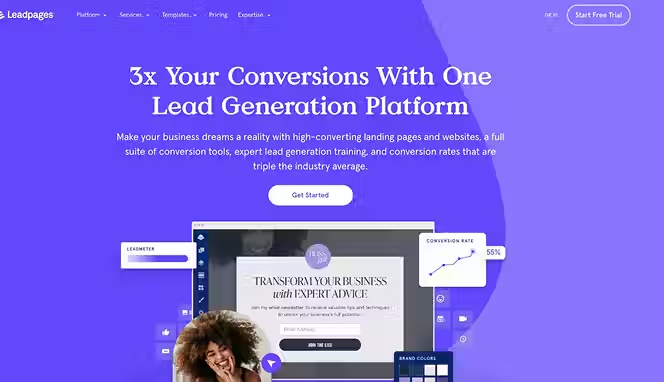
LeadPages is another landing page and lead capture tool, but it leans more toward ecommerce and small businesses. The platform has a huge template library, makes it easy to add payment processing, and integrates with everything. If you're running Facebook ads and need quick, high-converting landing pages, LeadPages gets the job done. The tool is simpler than Unbounce but still powerful. Pricing is more accessible for smaller teams, which is why a lot of solopreneurs and small agencies use it.
Key Features:
- 250+ professionally designed templates for landing pages, popups, and alert bars saves you from designing from scratch. Templates are industry-specific and conversion-tested, so you're starting with something that already works. You customize them with your branding and message.
- AI Engine for content generation creates headlines, ad copy, and images using AI. You tell the tool what your offer is, and it generates options. This is fast for teams without copywriters. AI isn't perfect, but it's a solid starting point you can refine.
- No-code popup and alert bar builder lets you add exit-intent popups and sticky bars to capture more leads. You can set triggers so popups only show to specific visitors. A visitor who scrolled past your main offer gets a popup. One who spent time on your page gets a different message.
- Payment integration and ecommerce features let you sell directly on your landing pages. You're not just capturing emails. You can sell products, courses, or services without sending people away from your landing page. Stripe, PayPal, and other processors are built in.
- Split testing and detailed analytics show you what's working. You see conversion rates, traffic sources, and which elements get clicked. You can keep testing to push your conversion rate higher.
8. Pipedrive
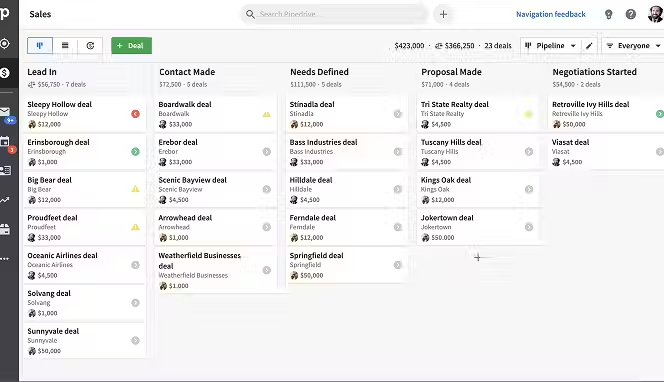
Pipedrive is a CRM built by salespeople for salespeople. The UI is visual and intuitive. You drag deals across a kanban board as they move through your pipeline. This makes deal progress obvious at a glance. Pipedrive focuses on lead management and sales pipeline, which means it's lighter than all-in-one platforms but better for pure sales execution. Small to mid-sized sales teams love it because it's affordable, easy to use, and gets out of the way.
Key Features:
- Visual sales pipeline with drag-and-drop interface makes deal management feel natural. You see every deal, what stage it's in, and how close it is to closing. Moving a deal across stages is as simple as dragging. This visual approach beats staring at spreadsheets or reports.
- LeadBooster add-on includes chatbot, live chat, web forms, and B2B prospector in one package. You can engage website visitors 24/7 with chatbot, qualify them, and route hot leads to your sales team. The prospector helps you find new leads from a database of 400+ million profiles.
- Automated lead assignment distributes leads to salespeople based on rules you set. A lead comes in, and the system instantly assigns it to the right person. You can assign by territory, capacity, or experience. This prevents leads from sitting unassigned.
- Custom fields and deal stages let you track the data that matters to your business. Every business is different, so you customize your pipeline. If you need to track budget, decision timeline, and stakeholders, you create fields for those. Your pipeline reflects your real sales process.
- 350+ app integrations on Pipedrive's marketplace connect your CRM to everything else. Your email, calendar, accounting, communication tools—all sync with Pipedrive. Data flows automatically, so your team stays organized.
9. Salesforce

Salesforce is the biggest name in CRM. It's an enterprise platform used by Fortune 500 companies and mid-market businesses. If you're a larger organization needing heavy customization and powerful analytics, Salesforce delivers. The learning curve is steeper than smaller platforms, but the capabilities are unmatched. You can build almost anything with Salesforce. It's expensive, so smaller businesses usually go somewhere else, but if you have the budget and complexity, it's worth it.
Key Features:
- Lead intelligence and scoring analyzes prospect data and predicts who's most likely to close. Salesforce uses historical data from your business to train an AI model that scores new leads. You can weight factors however you want: engagement level, fit, budget size, whatever matters to you.
- Einstein AI features help with everything from predicting deal size to recommending next actions. The AI learns from your data and gives your salespeople recommendations. It's like having an experienced manager coaching them through every deal.
- Native integration with Marketing Cloud connects your sales and marketing teams in one ecosystem. Marketing loads leads into Salesforce, your sales team works them, and when they convert, data flows back to marketing. You get a complete view of the entire customer journey.
- Advanced reporting and dashboards let you track KPIs at the team level, individual rep level, and by product. You can see conversion rates, sales cycle length, and deal velocity. Custom reports answer any question about your sales process.
- Customizable objects and fields mean Salesforce molds to your exact process. If your sales process is unique, you can build it in Salesforce. Some implementation takes time, but once it's set up, the payoff is huge.
10. Intercom
Intercom is a customer communication platform that handles chat, email, and targeted messaging. You can use it for support, sales, and marketing. The key feature is the ability to start a conversation with a visitor in real time, qualify them, and either continue chatting or book a demo. Intercom is best for B2B SaaS companies that want to capture leads from their website through live chat. It's also powerful for onboarding customers after they sign up.
Key Features:
- Business Messenger appears on your website and lets you send targeted messages to specific visitors. You can trigger messages based on page behavior, company data, or custom attributes. A visitor on your pricing page gets a different message than someone reading a blog post.
- Automated lead qualification with Fin (Intercom's AI) asks qualification questions in chat and collects information. Instead of manual conversation, Fin can handle initial questions and qualify leads before handing them to your team. This speeds up the process and qualifies leads in parallel.
- Seamless routing to your CRM sends qualified leads directly to Salesforce, HubSpot, or other platforms. When a chat visitor is qualified, they can be created as a lead or contact in your CRM automatically. Your sales team never misses anyone.
- Scheduled meetings and product demos let visitors book time with your sales team directly from chat. A chatbot can offer a demo, and the visitor clicks to schedule. It's integrated with calendars like Calendly and Chili Piper, so meetings appear on your sales rep's calendar instantly.
- Conversation history and team assignments keep your whole team on the same page. When a lead chats, their conversation history is visible to everyone. You can assign chats to specific team members, and they can pick up mid-conversation. No repetition, faster resolution.
11. Reply.io
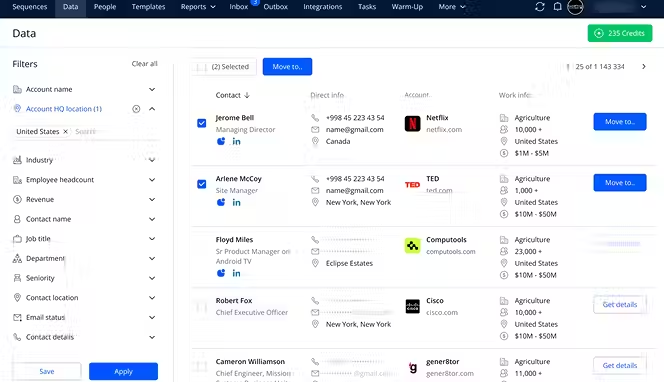
Reply.io is a sales engagement platform built for cold outreach at scale. You define your ideal customer profile, and the tool finds prospects matching that profile from a database of over 1 billion B2B contacts. It writes personalized emails, sends them via multichannel sequences (email, LinkedIn, SMS, calls), and tracks responses. If you're running an outbound sales team and need to generate leads through cold outreach, Reply.io handles it.
Key Features:
- AI-powered email and message generation writes personalized cold emails based on the prospect's profile and website. You don't type anything. The AI reads their LinkedIn profile, visits their company website, and crafts a unique message. Each email is different, so inboxes don't see patterns.
- Real-time B2B database with 1 billion+ contacts gives you access to verified email addresses and B2B data. You search by company size, industry, job title, hiring patterns, and tech stack. You can narrow down to exactly who you want to target. Emails are verified so bounce rates stay low.
- Multichannel sequences combining email, LinkedIn, SMS, and calls increases your chances of getting a response. Someone might not respond to email but will take a LinkedIn message. Reply.io sends across channels intelligently, knowing which ones work best for different prospects.
- Conditional automation and follow-ups trigger next steps based on responses. If someone opens your email but doesn't click, they get a follow-up. If they click but don't reply, another message goes out. If they reply "not interested," you can send a break-up email and stop. Everything is automated.
- Advanced email warmup and deliverability improves your inbox placement. Reply.io warms up your email inboxes by sending emails between warm accounts so your domain gains reputation. This keeps your emails out of the spam folder, so more people see them.
12. Mailchimp
Mailchimp is the biggest email marketing platform in the world. Millions of businesses use it to send newsletters, promotional emails, and automated sequences. You capture leads with forms and popups, segment your audience, and send targeted campaigns. Mailchimp recently added AI features to help write copy, and it integrates with social media ad platforms. If you're looking for a simple, affordable email marketing tool that doubles as a lead management platform, Mailchimp is it.
Key Features:
- Lead capture forms and landing page builder let you build opt-in forms and simple pages to capture emails. You can use popups on your website or embed forms. Mailchimp's form builder is drag-and-drop, so non-technical people can do it. Forms connect directly to your email list automatically.
- Audience segmentation and tagging splits your list into groups based on behavior, demographics, or engagement. You can send a campaign to people in one industry, another campaign to people in a different one. Segmentation leads to higher open rates and click rates because messages are relevant.
- Email automation and drip campaigns send sequences of emails based on triggers. When someone signs up, they get a welcome email. If they open it, they get one message. If they don't, they get something different. You build sequences once, and they run on autopilot.
- A/B testing for subject lines and content lets you test what works. Mailchimp splits your audience and sends two versions. It tells you which one performs better. You keep testing to push your metrics higher.
- Native integrations with Facebook, TikTok, Google, and LinkedIn sync your Mailchimp list with ad platforms. You can build audiences for ads based on Mailchimp segments. Leads you capture become targeted ad audiences. Your marketing compounds because you're using your own data.
13. HubSpot
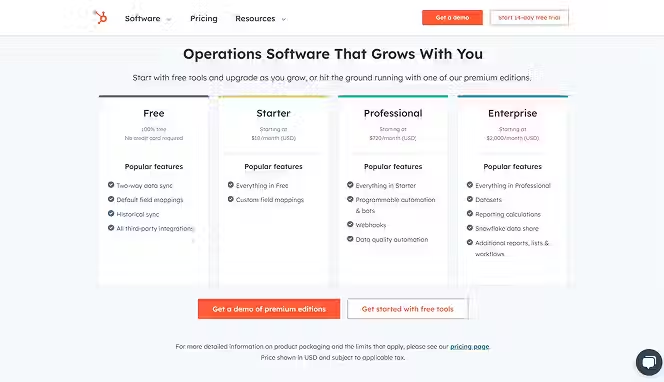
HubSpot is a complete marketing, sales, and customer service platform. You can use it as a free CRM with basic features, or upgrade to Marketing Hub or Sales Hub for more power. HubSpot is known for inbound marketing. You attract leads through content, capture them on landing pages and forms, and nurture them with email. The free tier is genuinely useful, so many small businesses start there. As you grow, you can add paid features. HubSpot also has thousands of integrations and a huge ecosystem of partners.
Key Features:
- Free CRM for lead management and contact organization gives you a centralized place to store lead data. You can see every interaction with each contact. HubSpot tracks emails, calls, meetings, and form submissions. No data lives in silos. Everything is in one place with full history.
- Marketing automation with custom workflows sends targeted messages based on prospect behavior. When someone downloads a whitepaper, they get added to a nurture sequence. If they visit your pricing page, you send them comparison content. Workflows run on autopilot so your team doesn't have to.
- AI-powered content recommendations suggests what content to send each lead. HubSpot's AI learns what works and recommends next actions. You get smarter recommendations as the system learns your customers' preferences.
- Landing page and form builder with conversion tools helps you capture more leads. HubSpot's forms are smart. They remember what someone has filled out before, so returning visitors don't see the same fields. Forms get shorter over time, so completion rates stay high.
- Lead scoring and prioritization with predictive scoring uses AI to identify leads most likely to buy. You don't have to define scoring rules. The AI learns from your data. It identifies patterns that predict conversion and flags those leads for your sales team.
14. Leadfeeder
Leadfeeder identifies companies visiting your website and shows you what pages they're looking at. You can see if a company visits your pricing page, downloads a whitepaper, or attends a webinar. This intent data is gold. You know when someone's actively researching and ready to buy. Leadfeeder lets you create custom feeds to track specific behaviors, like anyone visiting your demo page. When a high-value company visits, Leadfeeder sends an alert.
Key Features:
- Website visitor identification reveals which companies are visiting your site, even if they don't fill out a form. Leadfeeder uses IP address matching to identify companies. You see company name, size, industry, and tech stack. This is first-party intent data, which is more accurate than third-party data.
- Custom feed setup lets you track specific behaviors. You can create a feed that alerts you when a company with 50+ employees visits your pricing page. Another feed tracks anyone from your target industries. You get notified in real time when someone matches your criteria.
- Lead enrichment with technographic and firmographic data adds details to your lead profiles. You see what tech a company uses, who works there, and company financials. This context helps your sales team have smarter conversations because they know the company's situation before calling.
- Integration with Salesforce, HubSpot, and other CRMs sends identified companies directly into your CRM. Instead of manually creating contacts, Leadfeeder does it automatically. Your sales team always has the freshest data.
- Behavioral analytics showing engagement patterns tracks how long companies spend on pages and which content they consume. A company that visits five pages and spends 10 minutes is more engaged than one that bounces in 30 seconds. You prioritize the engaged ones.
15. Overloop AI
Overloop AI is an outbound sales automation platform powered by AI. You define your ideal customer profile, and Overloop finds matching prospects from its database of 450+ million contacts. It writes personalized emails automatically, manages multi-channel sequences, and tracks analytics. Overloop also has solid LinkedIn automation, so you can grow your network while running campaigns. If cold outreach is your primary lead generation channel, Overloop handles it all.
Key Features:
- AI-powered prospect sourcing based on your ideal customer profile finds exactly who you want to target. You describe your ICP, and Overloop builds your list automatically. It pulls from a database of 450+ million contacts with detailed profiling. Lists are delivered daily so you always have fresh prospects.
- AI email generation writes personalized emails from scratch based on prospect context. Overloop reads their LinkedIn profile, visits their company website, and crafts unique subject lines and messages. No templates. No variables. Each email is different. This approach gets higher open rates because emails feel genuinely personalized.
- Multi-channel campaign sequences combine email, LinkedIn, SMS, and calls in one workflow. Your first touch might be a LinkedIn connection request. Your second is an email. Your third is a direct message. Overloop coordinates all channels so your prospect hears from you in their preferred way.
- Advanced email warmup improves deliverability by warming your email inboxes. Overloop sends emails between verified accounts to build your domain reputation. This keeps you out of spam folders so more people see your messages. You can connect unlimited email accounts so you scale without hitting sending limits.
- Campaign analytics and A/B testing shows you exactly what works. You see open rates, click rates, reply rates, and booking rates for each campaign. You can test subject lines, email approaches, and sequences. Data guides your optimization so you improve over time.
Conclusion
Lead generation tools aren't luxuries anymore. They're how you compete. Your business can't grow if you're generating leads the same way your competitors are. The best lead generation platforms automate repetitive work, give you data to make smarter decisions, and help your team focus on closing deals instead of admin. Pick one and start with the basics. Get leads flowing into your CRM. Once that works, add complexity. Test different channels and messaging. Keep what works and kill what doesn't.
Start your dropshipping business today
Lead Generation Tools FAQs
What is the best lead generation tool for small businesses?
For small teams on a budget, HubSpot's free CRM paired with Mailchimp for email works well together. You capture leads on landing pages, organize them in HubSpot, and nurture them with Mailchimp sequences. Both have affordable plans that scale with you. If you run ads, LeadPages is a cheap way to build high-converting landing pages. Start simple, then add tools as you grow and your needs change.
How much should I expect to pay for lead generation tools?
Pricing varies wildly. Free tiers exist for HubSpot, Mailchimp, and others. Basic paid plans start around $30-50 a month for landing page builders and email platforms. CRMs typically run $50-100 monthly for small teams. Sales engagement tools like Reply.io and Overloop range from $50-200 depending on features. Enterprise platforms like Salesforce cost thousands. Start with affordable tools and upgrade as you see ROI.
Can I use multiple lead generation tools together?
Yes, most tools integrate with each other through APIs or Zapier. You can use Typeform to capture leads, send them to HubSpot, nurture them with Mailchimp, and track behavior with Leadfeeder. The best setup uses each tool for what it does best. Forms capture leads, CRM organizes them, email nurtures them, and intent data finds hot prospects. Integration matters, so check compatibility before buying.
How do I measure if lead generation tools are working?
Track cost per lead and conversion rate from lead to customer. If a tool costs $100 monthly and generates 50 leads, your cost per lead is $2. If 10% of those convert to customers, your cost per customer is $20. Compare that to your customer lifetime value. If customers spend $500 with you on average, a $20 acquisition cost is profitable. Keep measuring and improving these numbers over time.


Launch your dropshipping business now!
Start free trial.avif)


Related blogs

Minea Review: Is It Worth It for Dropshipping Product Research?
Read this Minea review to explore its features, pros, cons, pricing value, and whether it is the right product research tool for dropshipping sellers.


Top AI Tools for Small Businesses in 2026
Learn about the top AI tools for small businesses in 2026 for content, finance, agents, and automation. Pick the best AI tools for small businesses that match your workflows and budget, from free and paid.


Which are the Best Print on Demand AI Tools in 2026?
Find out which are the Print on demand AI tools in 2026. Save time, boost ROI, and improve product quality. Compare features, pricing, and real workflows for POD stores.
