


How to Use Notion to Streamline Your Dropshipping Business?
Learn how to use Notion to streamline your dropshipping business. Set it up right, start tracking better, and organize your content calendars too.


If you're running a dropshipping business, you're juggling a lot. Supplier emails pile up. Product data lives in spreadsheets. Customer orders scatter across platforms. Your brain becomes the only place holding everything together. This is unsustainable. You need a system that brings everything into one place where you can see it, manage it, and scale it. That system is Notion.
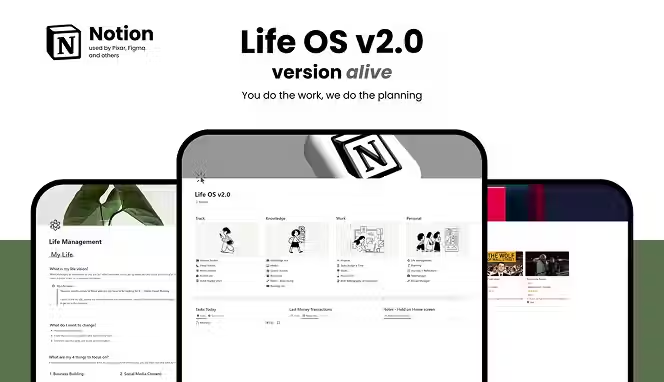
In this guide, we'll show you how successful business owners use Notion for their operations, and how you can steal their strategies for your own dropshipping store.
What Is Notion?
Notion is an all-in-one AI workspace that combines notes, databases, task management, and calendars into one tool. Think of it as a spreadsheet that talks to itself. It's a notebook that remembers things. It's an organizer that shows you your whole business at a glance.
What makes Notion different from just using Excel or Google Sheets? Notion databases can connect to each other. When you update one piece of information, it automatically updates everywhere else. You don't need five different apps running simultaneously. Everything lives in one place, which means less time switching between tools and more time actually running your business.
How Notion Works
Notion uses databases (think of them as spreadsheets) that connect together through relations. If you create a database for suppliers and another for products, you can link each product to its supplier. When someone asks "which products come from this supplier?", Notion already knows.
You also create views of your data. One view could be a table showing all suppliers with their contact info. Another view of the same data could be a kanban board showing which suppliers are reliable, which are slow, and which need follow-up. Same information, different angles depending on what you need to see.
Finally, you build dashboards (your main pages) that pull information from multiple databases and show you only what matters. Your dashboard shows today's tasks, active campaigns, products that need attention, and supplier issues. You open Notion, and everything you need is right there.
Key Features of Notion for Dropshipping
Here is what Notion makes so good. Here are its key features:
- Databases: Lists of information (suppliers, products, customers, orders)
- Relations: Connections between databases (linking products to suppliers, orders to customers)
- Filters and Sorting: Show only what you need right now (active suppliers, pending orders, slow product movers)
- Formulas: Calculations that happen automatically (profit margins, lead times, inventory levels)
- Templates: Pre-built page formats so when you add a new supplier or product, all the right fields are already there
- Integrations: Connects with tools you already use (Zapier can send data from your email into Notion)
- Dashboards: Your main page that shows the whole business at once without overwhelming detail
- Team Access: Multiple people can use the same workspace, each seeing only their relevant information
Why Use Notion as a Dropshipper?
Most dropshippers are drowning in information. Your suppliers have different communication styles. Some email, some message, some only respond on WhatsApp. Your product data is half in your store platform, half in a spreadsheet. Customer feedback lives in Shopify, emails, and your brain. This fragmentation costs you money and sanity.
Notion for dropshipping solves this by bringing everything into one searchable system. When a customer asks about a product, you see its supplier history, lead times, quality ratings, and previous customer feedback in seconds. When a supplier goes silent, you see instantly what orders are pending with them. When you need to know your profit by supplier, the numbers are already calculated.
The second reason to use Notion for business is delegation. Right now, everything lives in your head. You can't take a day off without the business stalling. With Notion for dropshipping, you document how things work. When you hire help, they open Notion, and they know what to do. You're not trapped.
The third reason is data-driven decisions. Without tracking, you guess. With Notion, you see patterns. Which suppliers have the fastest lead times? Which products have the highest profit margins? Which customer segments buy the most? This information guides your decisions instead of gut feel.
How to Use Notion for Your Dropshipping Business
Here are different ways on how to use Notion to streamline your dropshipping business:
1. Organize Your Content
You can separate your personal life from work completely in Notion. You can use it as a personal hub (vacations, family time, personal goals) and a business hub (work, content, sales). This prevents burnout. For dropshipping, this means when you close the business section of Notion, work actually stops. You're not thinking about suppliers at 11 PM.
You can use Notion to split your content marketing into three repeating phases:
- Growth Phase (4-6 weeks): Content introducing your products to new people
- Nurture Phase (4-6 weeks): Content showing why your products matter (testimonials, benefits, reviews)
- Sales Phase (1-2 weeks): Content asking people to buy
This cycle works for any product. A seasonal dropshipping product could follow this same 14-week rhythm, adjusting timing based on when you want to launch.
2. Connect Your Info
Another way you can use Notion is to connect all your info together. Instead of supplier emails scattered in Gmail and product info in separate places, everything can live in Notion. When you sit down to create content about a product, you can use Notion to show you read before about research; even every supplier detail, every customer review already linked to that product. You don’t have to hunt but organize all your notes and sources in one place.
For dropshipping, this means when you contact a supplier, you instantly see: How many active orders from them? What was the last issue you had? How long was their last lead time? What did previous customers say about their quality? This information was collected as you worked, automatically connected and ready.
3. Build Systems
The third way you can use Notion is to build a system that grows with your business solo. You can set up Notion in a way that accommodates your team. Let’s say you’re hiring later, so you can create separate "teams" in Notion (Ops, Marketing, Customer Service). Each team sees only their information. Set access levels so employees can add and edit information but not accidentally break the database structure. When it comes time to hire, you just add a new person and they will immediately see what they need to do.
For dropshipping, this means building right from day one. Create a supplier database. Create a products database. Link them. Give yourself admin access (you can change anything) and plan for employee access (they can edit content but can't change structure). When you hire your first VA or customer service person, they log in and understand the system immediately.
How to Set Up and Use Notion to Manage Your Dropshipping Business
Now here is a handy guide on how to set up and use Notion. This will work well for starting, managing, and growing your dropshipping business:
Step 1: Create Your Core Databases
Start with four basic databases. These are the foundation:
- Suppliers: Supplier name, email, phone, lead time, quality rating, reliability score, payment terms, recent issues
- Products: Product name, supplier (linked), profit margin, current status, inventory level, category
- Orders: Order number, customer name, product, date received, fulfillment status, tracking info
- Customers: Customer name, email, lifetime value, repeat customer, feedback, contact date
That's literally it. You don't need more. Everything else connects through these four.
Step 2: Link the Databases Together
This is where Notion becomes powerful. Your Products database connects to your Suppliers database. When you're looking at a product, you see which supplier it comes from. When you're looking at a supplier, you see all their products.
Your Orders database connects to both Customers and Products. So when you're checking on an order, you see the customer info and the product info and the supplier info all in one place.
Step 3: Create Your Dashboard (Main Page)
Your dashboard is the first thing you see when you open Notion. It shows:
- Your tasks for today (sorted by priority)
- Active campaigns or product launches (by phase)
- Suppliers that need follow-up (flagged or with issues)
- Recent orders (pending fulfillment)
- Quick links to your most-used pages
You don't scroll through complex information. You see at a glance what needs your attention right now.
Step 4: Build Standard Pages
Create standard templates for common tasks:
- New Supplier Onboarding: Same questions every time (minimum order quantity, shipping time, quality standards, contact preference)
- New Product Addition: Same fields every time (product name, category, supplier, profit target, marketing plan)
- Order Status Check: Same info every time (which supplier, what's the current status, when should it arrive)
When you or your team creates a new entry, the template prepares the page automatically. You're not reinventing the structure each time.
Step 5: Set Access Levels (Even If Solo)
Create two access groups in Notion:
- Admin: That's you. You can change database structure, add new suppliers, modify settings
- User: Future employees. They can add and edit information but can't break the foundation
Set this up now. When you hire someone, you just add them to the User group and they're ready to go. You're not scrambling to fix permissions later.
Step 6: Add Your Data Gradually
Don't try to import everything on day one. Start with your current suppliers. Add them to the Suppliers database with key info. Then add your active products. Link them. As new suppliers come in, you add them. As you add products, you link them to suppliers.
Within a month, your system has real data working for you. You're seeing patterns. You're making better decisions.
Step 7: Create Formulas for Key Metrics
Once your system has data, use formulas to calculate what matters:
- Profit Margin: Selling price minus supplier cost (tells you which products make the most money)
- Days to Delivery: Order date to delivered date (shows which suppliers are fast and which are slow)
- Supplier Performance Score: Combination of response time, quality rating, and issue history
These formulas update automatically. You don't manually calculate. You just see the results.
Real-World Example of Notion for Dropshipping
Let's say you're dropshipping phone accessories. You have 5 suppliers. You carry 50 products. You get 100 orders a month.
This is what your Notion setup will look like:
- Suppliers database: 5 entries, tracking each supplier's lead time, reliability, communication speed
- Products database: 50 entries, each linked to a supplier, showing profit margin, inventory level, sales volume
- Orders database: Automatically filled from your Shopify store (or manual entry), showing status, customer, product, supplier
You open your dashboard on Monday morning:
- You see that Supplier A is running 2 days behind on lead time (flagged in red)
- You see that your "wireless charger" product (your highest profit item) needs reordering
- You see that 3 orders from the weekend are pending supplier confirmation
- You see that Customer B is a repeat buyer who spent $500 this month
- You see that 8 orders are ready to ship out today
You spend 5 minutes reviewing. You send a message to Supplier A asking about the delay. You reorder the wireless chargers. You confirm the 3 pending orders with suppliers. You personally message Customer B thanking them for the repeat business. You pack the 8 ready orders.
Without Notion, you'd spend the morning hunting through emails, checking Shopify, digging through spreadsheets. With Notion, everything is summarized and ready. That's the actual difference.
Notion Examples and Use Cases for Dropshippers
- Example 1: You're launching a new product line. Create a project in Notion. List all tasks (source supplier, get samples, write descriptions, create graphics, set up listings). Assign due dates. Assign responsible people. Your team sees the whole timeline. Nothing falls through cracks.
- Example 2: A customer complains about product quality from Supplier X. You open Notion, find all orders from Supplier X, see the pattern. Maybe 1 in 50 orders has issues (acceptable). Maybe 1 in 10 has issues (needs a supplier conversation). Data tells you the truth.
- Example 3: You want to hire your first employee. Before you do, you build out your Notion system completely. You document your processes. You create SOPs (standard operating procedures) in Notion showing exactly how to handle orders, how to contact suppliers, how to deal with customer complaints. Your employee reads Notion instead of asking you a hundred questions.
- Example 4: You're deciding whether to expand to a new niche. You check your Notion dashboard. Which customer segments are growing? Which niches have the highest profit margins? Which suppliers have capacity to add new products? You make the decision based on data.
How to Organize Your Business with Notion
Organization in Notion isn't about having the most databases or the prettiest design. It's about:
- Finding information fast: When you need to know something, you find it in under 30 seconds
- Making decisions with data: You see facts, not guesses
- Delegating without friction: Your team knows what to do without constant instruction
- Preventing burnout: Work is contained. When you close Notion, work is closed
- Scaling without rebuilding: Your system works the same for 10 orders a day as 100 orders a day
Organization starts with your four core databases. Everything else is built on that foundation. You add complexity only when you actually need it. Most dropshippers never need more than 10 databases. Most use only 6 or 7.
Best Ways to Use Notion for Your Business
Here are some of the best ways you can use Notion. These are good for dropshipping businesses:
Use 1: Supplier Performance Tracking
Create a dashboard that shows you supplier performance at a glance. Which suppliers have the fastest lead times? Which have the best quality? Which communicates fastest? Which ones need performance conversations? This information guides your sourcing decisions.
Use 2: Product Performance Analysis
Track which products sell the most, which have the highest profit, which have repeat customers. Use this data to decide what to keep stocking and what to discontinue. You're making decisions based on actual sales, not hunches.
Use 3: Content Planning by Phase
Use the three-phase content strategy mentioned earlier. Plan your marketing in cycles: Growth (awareness), Nurture (social proof), Sales (conversion). Track which content drives orders. Repeat what works.
Use 4: Customer Segmentation
Separate customers into groups: first-time buyers, repeat customers, high-value customers, at-risk customers (haven't ordered in months). Treat each group differently via customer segmentation. First-time buyers need onboarding. High-value customers need special attention. At-risk customers need win-back campaigns.
Use 5: Inventory Management
Link your Notion database to manage your actual inventory (if possible through integrations) or manually update stock levels weekly. See which products are moving fast (need reordering soon) and which are stagnant (consider discontinuing). Never run out of your best sellers.
Use 6: Team Workflow Management
Assign tasks to team members. Track who's responsible for what. See bottlenecks. If customer service tasks are piling up, you know you need another person there. If supplier communication is taking hours, you know that's your bottleneck. Notion makes these problems visible.
How Notion Integrates With Your Dropshipping Tools
Notion doesn't work in isolation. It integrates with the tools you already use. Here are some popular integrations it supports:
- Zapier Integration: When someone orders from your Shopify store, Zapier automatically creates an entry in your Notion Orders database. No manual data entry. Your order information is always up to date in Notion.
- Email Integration: You can set up rules so that emails from specific suppliers trigger automatic entries in your Supplier Communication log. You're building a historical record without extra work.
You Can Import Spocket’s Product Data Too
If you use Spocket for sourcing (Spocket has the best US and EU dropshipping suppliers with 24/7 VIP support and over 100 million winning products), you can import product data into Notion. You could track which Spocket products are selling best. Spocket offers automated inventory management and one-click product imports, making it easy to keep your Notion system updated with new product additions.
These integrations save you hours. You're not manually copying information between tools. Everything syncs automatically.
Avoiding Common Notion Mistakes
If you’re a dropshipper, you should not make these common Notion mistakes:
Mistake 1: Creating Too Many Databases
Beginners create a database for everything. Suppliers, products, orders, customers, vendors, inventory, suppliers again under a different name, customer interactions, order history, past orders, archived orders. Suddenly there are 30 databases and nobody knows which one is current.
Solution: Start with 4 databases. Add more only when you actually need them. Most dropshippers never need more than 10.
Mistake 2: Not Connecting Databases
People create databases but don't link them. So you have a supplier name in both Suppliers and Products databases. When you rename a supplier, you have to update both places. Data gets out of sync.
Solution: Use relations to connect databases. One source of truth.
Mistake 3: Overcomplicating Dashboards
You create a dashboard that shows everything at once. Profit margins, supplier performance, inventory levels, customer segments, order status, team tasks, content calendar. It's overwhelming. Nobody actually uses it.
Solution: Dashboards should show only today's action items. Deep data goes in the databases. Your main dashboard is simple: Here's what you need to do today.
Mistake 4: Not Giving Team Members Access Properly
You give employees the wrong access level. They accidentally delete a database property. It breaks everything. Now you're scrambling to fix it.
Solution: Set access right from the beginning. Admin for you. User for employees. Users can add and edit information but can't change structure.
Mistake 5: Abandoning the System
You set up Notion beautifully, then stop using it. Now your team doesn't trust that the data is current. Nobody updates it. It becomes a monument to good intentions.
Solution: Use Notion for 5 minutes each morning as part of your routine. Check your dashboard. It takes 5 minutes and keeps everything alive.
Conclusion
Notion is not a productivity hack. It's like a digital infrastructure for your dropshipping business. The difference between a dropshipper who stays small and one who scales is usually not luck or products. It's systems. The businesses that scale have organization. The ones that don't are chaos. Notion brings order to chaos. You get suppliers linked to products. Products linked to orders.
Orders linked to customers. Everything talks to everything else. You see patterns. You make better decisions. You delegate without friction. You stay sane. Start small with four databases. Link them together. Build your dashboard. Add data gradually. Let it work for you. Within a month, you'll wonder how you ever ran your business without it.
Oh, and if you want to start dropshipping trending products, use Spocket!
Start your dropshipping business today
Notion for Dropshipping FAQs
Can I use Notion for dropshipping if I'm completely new to it?
Yes. Notion is beginner-friendly. Start with four simple databases (suppliers, products, orders, customers) and link them together. You don't need complex formulas or advanced features to get value. Many successful dropshippers built their systems without prior Notion experience. Spend 30 minutes watching a tutorial, then build your first database. You'll learn quickly by doing.
How much does Notion cost for a dropshipping business?
Notion offers a free plan that works for most small dropshippers. The Personal plan is $10/month, and the Team plan is $8/person/month. You don't need to pay anything to start. The free plan gives you unlimited blocks and databases, perfect for building your initial system.
Can Notion automatically pull data from my Shopify store?
Not directly within Notion. However, Zapier acts as a bridge between Shopify and Notion. When someone orders from Shopify, Zapier creates an entry in your Notion Orders database. This automation saves hours of manual data entry and keeps your systems in sync without constant effort.
What if I don't know how to set up database relations in Notion?
Database relations are simpler than they sound. You're just saying "this product comes from this supplier." Notion has templates built specifically for this. Start with templates instead of building from scratch. Copy a template, delete what you don't need, keep what you do. Most dropshippers adapt templates instead of building from scratch.
How do I share my Notion system with my team without them breaking it?
Create access groups in Notion. Admin (you) has full access. User (employees) can edit content but can't modify database structure. Set permissions correctly from day one. Users can add suppliers, update order status, and edit customer info without accidentally breaking your system.
Can Notion replace my ecommerce platform or shipping software?
No. Notion is a management and organization tool, not a store platform or shipping software. You still need Shopify, WooCommerce, or similar for your actual store. You still need your shipping software. Notion sits on top of these tools, pulling information from them and helping you organize everything. It's the control center, not the entire operation.


Launch your dropshipping business now!
Start free trial.avif)


Related blogs
Dropshipping Supplier Directory: Where to Find Vetted Suppliers
Browse our directory of vetted dropshipping suppliers across the US and EU, complete with niches, shipping speed, and pricing. Start your free trial today.

How to Negotiate With Dropshipping Suppliers: 9 Tactics That Actually Work
Learn how to negotiate with dropshipping suppliers on price, MOQs, and payment terms. Proven tactics and email scripts to boost your margins. Try Spocket free.

Is AliExpress Legit? A Safety Check for Buyers and Dropshippers
Is AliExpress legit? Yes, but sellers vary. See how Buyer Protection works, what the EU's 2026 fine means, customs costs, and whether it's safe for dropshipping.

