


PWA for Mobile Dropshippers Masterclass: Beginner's Guide (No Coding Needed!)
Start building a PWA for mobile dropshipping and get more sales. No coding needed. Get great speed, offline access, and higher conversions.

You have likely heard the success stories. People are building profitable dropshipping businesses from their phones, often while juggling other commitments. Yet many aspiring entrepreneurs hold back because they think they lack the right tools. The common refrain is “I don’t have a laptop” or “I can’t afford a developer.” The reality is that modern web technology has made those barriers obsolete. You can build a fully functional mobile store that rivals any native application using just the phone in your pocket.
This masterclass shows you exactly how to achieve that. We will walk through what a Progressive Web App (PWA) actually means for a dropshipper, why it matters for your bottom line, and how to implement it. You will see that you do not need to write a single line of code to give your customers an app‑like shopping experience that works offline and loads instantly.
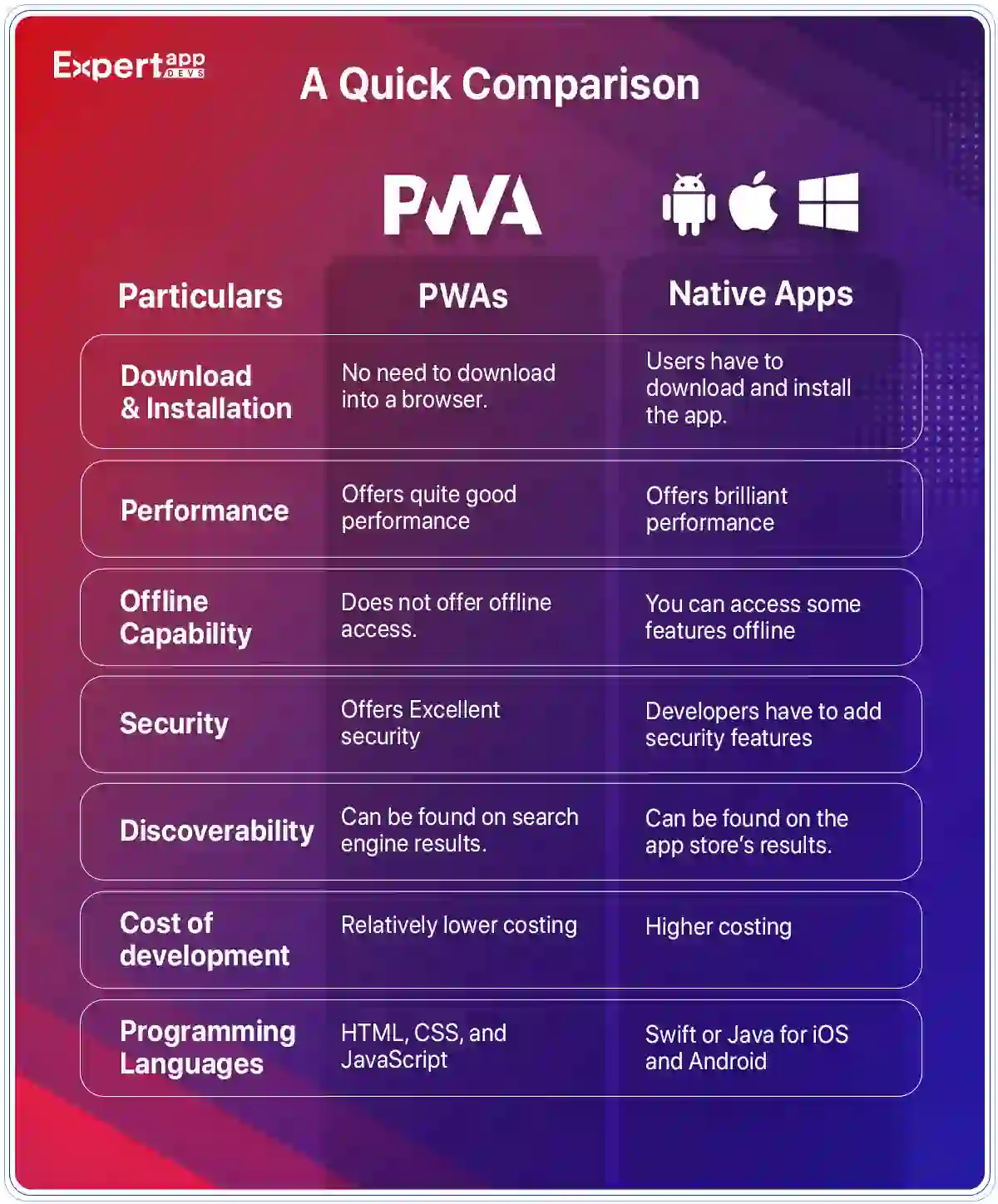
We cover the technical backbone of PWAs, the specific advantages for mobile conversion rates, and a step‑by‑step approach to setting up your store. You will also learn how to choose the right no‑code builder to launch your PWA for mobile dropship business without technical headaches.
What Is a Progressive Web App in Ecommerce?
A Progressive Web App sits at the intersection of a traditional website and a native mobile app. It is a web application that behaves like a native app but runs entirely inside a browser. For a dropshipper, this means your store can be installed directly on a customer‘s home screen without requiring them to visit the Apple App Store or Google Play Store. Once installed, the store opens in full‑screen mode with no browser address bar, creating an immersive dropshipping experience that feels professional and trustworthy.
The technology behind this involves three core components. First, a service worker runs in the background and acts as a middleman between the browser and the network. This is the mechanism that enables PWA service worker caching, which stores assets locally so that pages load almost instantly on repeat visits. Second, a web app manifest is a JSON file that tells the browser how the app should look when installed, defining the icon, splash screen, and theme color. Third, the entire setup must be served over HTTPS for security. These elements work together to create a Progressive web app ecommerce solution that bridges the gap between the open web and the controlled environment of an app.
Why a PWA Outperforms a Standard Mobile Site for Dropshipping
Many dropshippers rely on a standard responsive theme that simply shrinks desktop content to fit a small screen. While that approach ensures the content is visible, it does not guarantee that it converts visitors into buyers. Mobile shoppers behave differently. They have less patience for slow load times, they navigate with their thumbs, and they often browse on unreliable network connections. A PWA directly addresses these pain points by prioritizing ecommerce mobile optimization and performance.
Faster Load Times and Better Core Web Vitals
A PWA caches the shell of your site and key product images so that return visitors do not have to wait for the server to send every file again. This significantly reduces Largest Contentful Paint (LCP) and Time to Interactive (TTI), two critical metrics in progressive web app core web vitals. When your store achieves strong core web vitals dropshipping scores, you reduce bounce rates and signal to search engines that your site offers a quality user experience. This speed advantage is a direct driver of revenue because mobile users abandon sites that take more than a few seconds to load. If you are trying to fix slow mobile site dropshipping issues, switching to a PWA architecture is one of the most direct paths to improvement.
Offline Functionality and Poor Network Resilience
One of the unique advantages of a PWA is its ability to function when the internet connection is weak or completely absent. A standard website shows a blank page or an error message when the signal drops. A PWA, by contrast, can display cached product catalogs, images, and even the customer‘s cart. This is possible because the PWA service worker caching strategy stores essential assets during the first visit. For a mobile dropshipping store whose customers might be commuting through tunnels or living in areas with spotty coverage, this capability prevents lost sales and keeps the browsing session alive. When connectivity returns, any pending actions can sync in the background.
Push Notifications Without an App Store
Re‑engaging customers is a constant challenge in dropshipping. With a native app, you rely on the user to enable notifications after downloading the app. With a PWA, you can prompt users to allow notifications directly from the browser, provided they have added the store to their home screen. PWA push notifications dropshipping campaigns can alert customers about back‑in‑stock items, flash sales, or abandoned carts. On Android and desktop, this feature is fully supported. On iOS, push notifications have been available since iOS 16.4, though they require the user to manually add the site to the home screen. Even with these platform nuances, PWA for mobile dropshipping offers a re‑engagement channel that a basic responsive site cannot match.
PWA vs. Native App: Which Is Better for a Dropshipping Business?
The debate over PWA vs native app dropshipping often centers on performance and cost. A native app built for iOS and Android provides the absolute best access to device hardware, the smoothest animations, and the deepest integration with operating system features. However, that level of polish comes with a price tag that often starts in the tens of thousands of dollars for a basic build, plus ongoing maintenance for two separate codebases. For a solo dropshipper or a small team, that investment is rarely justifiable.
A PWA offers a practical alternative. You build a single codebase that works on iOS, Android, and desktop browsers. The cost to build PWA vs mobile app is a fraction of the native route, especially when you use no‑code tools that integrate directly with your existing store platform. While a native app still holds an edge in raw rendering speed and push notification engagement rates, a PWA delivers a dropshipping experience that is smooth enough for the vast majority of product browsing and checkout flows. For most dropshipping businesses, a PWA is the logical first step because it solves the immediate problem of mobile conversion friction without draining the marketing budget.
How to Create a PWA for Dropshipping Without Coding?
You do not need to be a developer to create a PWA for dropshipping. Several Shopify PWA app options and standalone builders handle the technical heavy lifting for you. The general workflow involves installing a PWA builder from your platform‘s app store, configuring a few visual settings, and letting the tool generate the necessary service worker and manifest files automatically.
The core process follows a straightforward pattern. First, you set up your online store using a platform like Shopify, WooCommerce, or Wix. If you are sourcing products for PWA for fashion dropshipping or PWA for electronics dropshipping stores, you can use a service like Spocket to import high‑quality inventory with fast shipping times. Once your products are in place, you select a PWA builder.
Many of these tools are designed specifically as a dropshipping mobile app builder that requires zero theme edits. You upload your app icon, choose a splash screen color, and publish. The builder injects a service worker and manifest into your site, instantly giving it offline capabilities and an add to home screen Shopify prompt. This approach makes Shopify PWA without coding a reality for merchants who want to stay focused on marketing and sales.
Best Tools to Turn Your Store Into a PWA
Here are some of the best tools we recommend. These are great for building a PWA for mobile dropshipping:
1. Progressier
Progressier is a dedicated PWA solution that works with Shopify and other platforms. It provides a complete toolkit for making your store installable on iPhones, iPads, Android devices, and even desktop computers. The app automatically generates a valid web app manifest and service worker, so you do not need to write any JavaScript. It also includes a dashboard for sending web push notifications to up to a million users in a single campaign. The tool adds custom install prompts that guide iOS users through the manual process of adding the site to their home screen. For a best PWA for Shopify contender, Progressier offers a clean balance of automation and control.
2. Qe PWA
Qe PWA positions itself as a free PWA builder for dropshipping with a one‑time fee option. It installs in a few minutes and works with any Online Store 2.0 theme. The app includes native support for push notifications on iOS and Android, a feature that many competing tools either lack or charge extra for. The setup process is minimal. You upload your logo, pick a color scheme, and preview how the install screen will appear. Qe PWA also maintains full theme compatibility, which means your existing store design remains intact while gaining PWA functionality. For merchants looking for a lightweight dropshipping mobile app builder, this is a solid entry point.
3. Apploy
Apploy takes a hybrid approach by offering both PWA and native app output from a single configuration. It uses your existing Shopify data as the single source of truth and maintains real‑time sync with products, collections, and third‑party apps. The platform emphasizes high push notification open rates and provides white‑glove support to help you navigate the setup. If you plan to eventually publish a native app to the Google Play Store or Apple App Store while keeping a PWA active, Apploy provides a unified backend to manage both. This makes it a flexible option for scaling a mobile dropshipping store.
Does PWA Work for iPhone Dropshipping?
Does PWA work for iPhone dropshipping? Yes, PWAs work on iOS, but with limitations that you should understand before committing. Users can add any website to their iPhone home screen manually, and if the site has a valid manifest file, it will open in a standalone window without the Safari browser chrome. Push notifications are supported on iOS 16.4 and later, but only if the user has added the site to the home screen. Unlike Android, there is no automatic install prompt. You must display a custom instruction that shows the user how to tap the Share button and select “Add to Home Screen.”
There are other constraints. Background sync does not exist on iOS PWAs, and storage quotas are more restrictive than on Android. If a large portion of your customer base uses iPhones, these factors matter. However, for a PWA dropshipping USA audience, the benefits of faster load times and a cleaner browsing interface still outweigh the iOS‑specific drawbacks. The key is to set realistic expectations and provide clear guidance for iPhone users who want the full app‑like experience.
PWA SEO and Mobile‑First Indexing
Search engine visibility is critical for any dropshipping operation. Google‘s mobile-first indexing PWA approach means that the search engine primarily evaluates the mobile version of your site for ranking purposes. If your mobile site is slow, cluttered, or difficult to navigate, your organic rankings will suffer. A PWA addresses this by delivering strong Core Web Vitals scores through efficient caching and minimal JavaScript bloat. When you improve metrics like Largest Contentful Paint and Interaction to Next Paint, you signal to Google that your site provides a high‑quality user experience.
PWA SEO ecommerce also requires attention to technical details. The service worker should not block search engine crawlers from accessing critical content. You must ensure that each page has unique metadata, that canonical tags are properly set, and that the manifest file does not interfere with crawling. When configured correctly, a PWA can improve your search rankings while also increasing the likelihood that visitors will return to your store directly via the home screen icon. This dual benefit makes PWA for mobile dropship a smart long‑term investment in organic traffic.
Optimizing Your Dropshipping Site Speed for Mobile
A mobile-first dropshipping strategy demands that you treat speed as a non‑negotiable feature. Even if you have the perfect PWA setup, bloated images, excessive third‑party scripts, and unoptimized apps can still drag down performance. The first step is to audit your store for unnecessary apps. Every script that loads in the background adds to the total page weight and delays interactivity. You should remove any app that is not actively contributing to sales or customer experience.
Next, focus on image optimization. Product images should be compressed without sacrificing visual quality, and you should serve them in modern formats like WebP. Implement lazy loading so that images below the fold only load when the user scrolls to them. This technique reduces initial page load time and conserves bandwidth for mobile users on limited data plans. Dropshipping site speed optimization is an ongoing process, but the combination of a PWA foundation and disciplined asset management will keep your store fast and responsive. This is especially important if you are running PWA for selling tech accessories or other product categories where customers expect a seamless browsing experience.
Internal Resources for Dropshipping Success
Building a PWA for mobile dropshipping is only one piece of the puzzle. You also need reliable suppliers, a solid understanding of the business model, and a curated selection of products that actually sell. Spocket connects you with vetted suppliers who offer fast shipping and high‑quality merchandise. Unlike many other sourcing platforms, Spocket has no MOQs, which means you can test products without committing to large upfront inventory purchases. This flexibility is essential when you are experimenting with different niches.
Finding winning products is easier when you have access to data. The trending dropshipping products page highlights items that are currently performing well across the network. If you are interested in niches like tech accessories or want to explore Print-on-demand options, Spocket provides the supplier network to support those efforts. For those using platforms beyond Shopify, Spocket integrates directly with Wix, WooCommerce, eBay, and BigCommerce. This ecosystem approach ensures that your mobile-first dropshipping strategy has the backend support it needs to scale.
Common Mistakes to Avoid When Building a PWA Dropshipping Store
Here are some common mistakes to avoid when building a mobile PWA store for your dropshipping business:
- Ignoring iOS user instructions: Many iPhone users will not know how to install a PWA unless you show them. Include a brief visual guide or a pop‑up that explains the “Share → Add to Home Screen” workflow.
- Overloading the site with third‑party scripts: Every additional app or tracking pixel adds latency. A PWA cannot compensate for a site bloated with unnecessary JavaScript. Audit your installed apps regularly.
- Assuming a PWA is a one‑time setup: Service worker updates and cache invalidation require attention. If you change your store design, you must ensure that the service worker updates properly so that customers see the new content.
- Forgetting to test on real devices: Emulators are helpful, but nothing replaces actual testing on an iPhone and an Android phone. Pay attention to how buttons size, how the keyboard behaves, and whether the checkout flow remains smooth.
- Neglecting metadata and structured data: A PWA is still a website in the eyes of search engines. Unique title tags, meta descriptions, and schema markup remain essential for organic discoverability.
Conclusion
A PWA gives your dropshipping store the speed, reliability, and app‑like feel that modern mobile shoppers expect. You do not need a large development budget or advanced coding skills to implement one. Using the no‑code builders discussed here, you can transform a standard online store into an installable, offline‑capable sales channel in a single afternoon.
The combination of faster load times, push notification capabilities, and home screen presence directly addresses the mobile conversion gap that holds back so many ecommerce businesses. Focus on building a clean, fast, and friction‑free experience, and your store will be positioned to capture sales wherever your customers are.
Start your dropshipping business today
PWA for Mobile Dropshippers FAQs
What is the main benefit of using a PWA for a mobile dropshipping store?
The primary advantage is speed. A PWA caches key assets locally, allowing pages to load almost instantly on repeat visits, which reduces bounce rates and increases the likelihood that a mobile visitor will complete a purchase.
Can I build a PWA without knowing how to code?
Yes. Several no‑code PWA builder apps for Shopify and other platforms handle the technical configuration automatically. You simply install the app, upload an icon, and the tool generates the necessary service worker and manifest files.
Will a PWA help my dropshipping store rank better on Google?
It can. Google‘s mobile‑first indexing prioritizes sites that load quickly and provide a smooth user experience. A PWA improves Core Web Vitals metrics like Largest Contentful Paint, which are direct ranking factors.
Do PWA push notifications work on iPhones?
They work on iPhones running iOS 16.4 or later, but only if the user has manually added the site to their home screen. The process is not automatic, so you should provide clear installation instructions for iOS users.
Is a PWA cheaper than building a native iOS and Android app?
Yes. A native app requires separate development for each platform and ongoing maintenance. A PWA uses a single codebase that works across devices, and no‑code builders make the setup accessible for a fraction of the cost.
How do I fix a slow mobile dropshipping site with a PWA?
The PWA architecture caches static resources and reduces the amount of data that needs to be fetched from the server on each visit. Combining this with image compression and removal of unnecessary third‑party scripts will significantly improve mobile load times.


Launch your dropshipping business now!
Start free trial.avif)


Related blogs
Dropshipping Supplier Directory: Where to Find Vetted Suppliers
Browse our directory of vetted dropshipping suppliers across the US and EU, complete with niches, shipping speed, and pricing. Start your free trial today.


How to Negotiate With Dropshipping Suppliers: 9 Tactics That Actually Work
Learn how to negotiate with dropshipping suppliers on price, MOQs, and payment terms. Proven tactics and email scripts to boost your margins. Try Spocket free.

Best Clothing Dropshipping Suppliers: The 2026 Guide
Compare the best clothing dropshipping suppliers for 2026 — US/EU shipping speeds, pricing, and product quality — and find the right fit to launch your store.
