


Best Free AI Voice Generators Online
Discover the best free AI voice generators online with realistic voices, multilingual support, customization, and practical use cases for content creators and businesses.
.avif)

AI voice generators have made it ridiculously easy to turn text into audio that sounds natural, expressive, and “human enough” for real content. Whether you’re narrating YouTube videos, building product explainers, creating accessibility-friendly blog audio, or recording training modules, free AI voice tools can get you started fast without a studio, microphone, or voice actor.
But “free” can mean very different things. Some tools are genuinely free with downloads. Some are free only for limited characters per month. Others are technically free but don’t let you export audio unless you upgrade. That’s why this guide focuses on what matters in real usage: voice quality, free-plan limits, language support, and how well each tool fits common creator or business workflows.
What is an AI voice generator
An AI voice generator (often called text-to-speech or TTS) converts written text into spoken audio using AI models trained on natural speech patterns. The best tools don’t just read words. They replicate pacing, emphasis, and tone so the audio feels less robotic and more like a real person speaking.
Most modern AI voice tools also include extras like:
- multiple voice styles (casual, professional, storytelling)
- multiple accents and languages
- pronunciation controls
- speed and pitch adjustments
- emphasis and pause controls
The main differences between tools come down to how realistic the output sounds and how flexible the editing controls are.
What “free” really means with AI voice tools
Before you choose from the best free AI voice generators online, it helps to understand the three most common “free” models:
Free forever (often with limits)
Some tools are genuinely free and let you generate and download audio without paying. The limits may be daily usage caps, fewer voice choices, or occasional ads.
Free tier (monthly character caps)
Many premium tools offer a free plan with a monthly allowance (for example, 10,000 characters). This is great for small projects and testing, but you can hit limits quickly for long scripts.
Free trial (feature-rich but export may be restricted)
A number of pro tools offer free trials where you can generate audio, but downloading/exporting might be restricted unless you upgrade.
This article calls out those differences clearly so you don’t waste time building a workflow around a “free” tool that won’t actually let you publish.
What makes a free AI voice generator worth using
When you’re choosing a tool, focus on these criteria:
- Voice realism: The best voices handle natural cadence and emotion.
- Export and usage rights: Can you download MP3/WAV? Can you use it commercially? Some free plans are strictly for evaluation.
- Language and accent coverage: If you’re narrating international content (or targeting customers across regions), multilingual voice libraries matter.
- Editing control: Some tools let you adjust word-by-word emphasis and pauses, which can make the difference between “okay” and “publishable.”
- Workflow fit: If you’re doing quick TikTok voiceovers, you need speed. If you’re narrating an audiobook, you need stability and long-form output.
7 Best free AI voice generators online
The demand for realistic, human-sounding voiceovers has grown rapidly, and AI has made high-quality audio creation accessible to everyone. The best free AI voice generators online allow you to convert text into natural speech without expensive software or recording equipment, making them ideal for creators, educators, marketers, and businesses looking to produce voiceovers quickly and affordably.
1. ElevenLabs (best overall voice realism on a free tier)
If you want the most “human” sounding audio on a free plan, ElevenLabs is one of the strongest picks. On the pricing side, ElevenLabs uses a credit system where text characters consume credits, and the included credits depend on the plan. You can verify how credits work on the official pricing page.
Why it’s great
- Very natural cadence and tone for narration
- Strong for YouTube voiceovers, product explainers, and ads
- Great “first tool” if you care about quality more than unlimited volume
What to watch out for
- Free tiers are character-limited, so long scripts will require batching or upgrades
- Always confirm commercial usage rights for your plan and use case (policies can differ by tier)
Best for: creators, marketers, ecommerce explainers, and premium-sounding short voiceovers.
2. Hume AI (great for expressive voices and a clear free plan)
Hume is often mentioned as a standout when you want expressive, emotion-aware speech. Hume is a top pick for “designing a voice from a prompt”.
Hume’s official pricing page clearly lists a Free plan and shows included characters for text-to-speech across tiers.
Why it’s great
- Expressive voices that can feel less “flat” than standard TTS
- Clear plan structure and transparent included character allowances
- Useful for storytelling, creative scripts, and brand voice experiments
What to watch out for
- You’ll want to review the commercial licensing line items if you plan to use the audio in paid campaigns
- Advanced voice features may be gated behind paid tiers
Best for: expressive narration, creative brand voice projects, and content creators who want emotion control.
3. TTSMaker (best free option if you want quick downloads without signup)

If you want a tool that feels truly free and simple, TTSMaker is a strong contender. TTSMaker describes itself as a free text-to-speech tool that supports 100+ languages and 600+ voices, and it allows downloads in formats like MP3 and WAV.
Why it’s great
- Easy, browser-based, and quick to generate audio
- Strong language coverage for a free tool
- Download-friendly workflow
What to watch out for
- Voice quality can vary by voice selection
- You should still check usage rights depending on where you publish and how you monetize
Best for: fast drafts, multilingual narration, simple voiceovers for short-form content.
4. Murf (excellent studio-style editor, but “free” is often evaluation-focused)
Murf is popular for marketing voiceovers and business narration because it’s built like a production tool.
However, Murf’s free access often comes as a free trial or evaluation plan with limits. Murf’s help documentation for API plans, for example, describes a Free Trial with a character allowance.
Why it’s great
- Strong editing control and pro workflow
- Good for polished brand voiceovers and corporate-style narration
- Emphasis and pacing controls can lift quality significantly
What to watch out for
- Free access may not allow exporting audio, depending on the plan/trial
- You’ll want to confirm what you can download and whether commercial use is allowed on free usage
Best for: marketing teams and creators who want a professional editor and are okay starting with evaluation/free trial.
5. Speechify (great for human-like cadence, but free access is limited)
Speechify is widely used for listening to text content and accessibility-style narration. Speechify is a top tool for human-like cadence, which makes it popular for reading-style voice output. Speechify’s pricing page explicitly distinguishes free vs premium plans, so it’s easy to verify what’s included at a high level.
Why it’s great
- Smooth “reader” cadence that works well for articles and scripts
- Helpful for turning written content into audio versions quickly
- Strong for personal productivity and accessibility use cases
What to watch out for
- The free plan is usually more limited in premium voices and features
- Export and commercial usage details should be checked if you plan to publish widely
Best for: listening-style narration, accessibility content, and quick article-to-audio conversions.
6. WellSaid (top-tier voice quality with a free trial)
WellSaid is known for studio-quality voices aimed at business, training, and marketing. The tradeoff is that it’s primarily a paid product, with free access usually coming as a trial. WellSaid’s pricing page states it offers a one-week studio trial, and it notes that downloading audio requires a paid plan.
Why it’s great
- High-quality, professional voices
- Strong for eLearning, internal training, product demos, and ads
- Built for teams and production workflows
What to watch out for
- Free trial is time-limited
- Audio downloads generally require a paid plan
Best for: teams that want premium voice quality and are evaluating before upgrading.
7. Luvvoice (simple free TTS with broad language support)
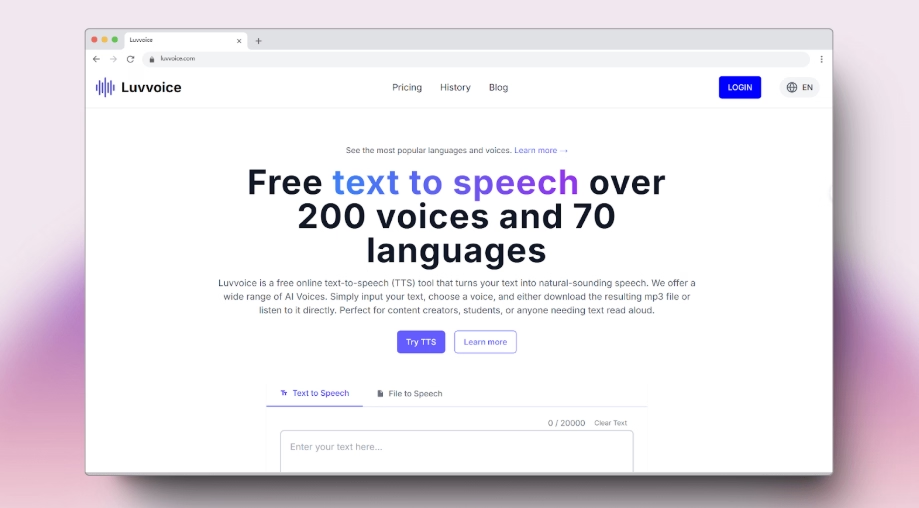
If you want a minimal tool that’s quick to use and doesn’t force a complex workflow, Luvvoice positions itself as a free text-to-speech solution with 70+ languages and 200 voices, with download support.
Why it’s great
- Fast, no-fuss generation
- Useful language coverage for a free tool
- Straightforward for short scripts
What to watch out for
- Voice realism may vary by language/voice
- You should confirm usage rights for commercial publishing
Best for: quick multilingual voiceovers and simple narration.
How to choose the right free AI voice generator for your needs
Here’s a practical way to pick without overthinking:
If you want the most realistic voice for voiceovers
Start with ElevenLabs and test a few voices on the same script.
If you want expressive, emotion-aware audio
Try Hume first, especially if your content benefits from tone shifts (storytelling, brand narration, character-like voice)
If you want something truly free and download-friendly
Use TTSMaker for quick conversions and broad language coverage.
If you want a studio editor workflow
Evaluate Murf (and consider upgrading if export restrictions block publishing).
If you’re doing reading-style narration and accessibility
Test Speechify for cadence and “read-aloud” usability.
Best ways to use AI voice generators for content and ecommerce
AI voice isn’t just for creators. It’s becoming a serious business advantage when used with intent.
Product explainers and landing page narration
Short voiceovers can improve clarity for products that need context (how it works, what’s included, sizing, setup). If you’re building a store with Spocket, voice can help you explain product value quickly, especially when customers are skimming.
Short-form ads and social content
AI voice lets you scale variations. You can test five different hooks and CTAs without recording five versions yourself.
Blog-to-audio repurposing
If your brand publishes guides and comparisons, adding an audio version increases accessibility and helps users consume content while commuting or multitasking.
Customer support snippets
A short AI-generated voice clip can guide customers through common issues (returns, shipping questions, product setup) in a friendly format.
Tips to get better audio from free AI voice generators
Free AI voice generators can produce impressive results, but the quality of the final audio often depends on how you use them. With a few simple adjustments to your script and settings, you can significantly improve clarity, tone, and natural flow—making even free AI-generated voices sound more polished and professional.
Write for speech, not for reading
Shorten sentences. Use contractions. Add natural pauses. If it sounds stiff when you read it aloud, it will sound stiff in TTS too.
Use punctuation strategically
Commas and em dashes often improve rhythm more than you expect.
Generate in sections
Free tiers are character-limited. Break scripts into 20–40 second chunks, then stitch them in a video editor.
Always preview multiple voices
Don’t settle for the default voice. Two minutes of testing can upgrade your output dramatically.
Double-check usage rights before monetizing
If you’re planning to monetize content, confirm commercial rights for your plan. That matters if you’re building a side hustle, aiming for passive income, or exploring ways to make money online using voiceover-driven content. Some people even look for apps to make money and tools that let them make money without investment, but the key is staying compliant with licensing so your content doesn’t get flagged later.
Conclusion
The best free AI voice generators online can save you time, production cost, and creative effort—especially when you’re producing content at scale. If you want realistic voiceovers that feel premium, start with ElevenLabs and test within its free tier while keeping an eye on character limits.
If you want something that feels truly free and download-friendly for quick projects, TTSMaker is one of the most practical options. And if you’re testing advanced workflows like expressive voice or studio-style editing, Hume and Murf give you a solid path to experiment before deciding whether a paid plan is worth it.
If your goal is to build content that supports ecommerce growth, voice can also help you stand out. For example, store owners using Spocket can add voiceovers to product explainers, short-form ads, and branded landing pages to improve engagement, clarify product benefits, and reduce buyer hesitation—especially for visual-first products where narration boosts understanding.
Start your dropshipping business today
FAQs about AI Voice Generators
What are the best free AI voice generators online?
Some of the best free AI voice generators online include tools like ElevenLabs (free tier), TTSMaker, Hume, Speechify (limited free plan), and Murf (free trial). These tools offer realistic voices, multiple languages, and easy text-to-speech conversion with varying usage limits.
Are free AI voice generators safe to use?
Yes, most reputable AI voice generators are safe to use, especially well-known platforms. However, it’s important to review privacy policies and avoid uploading sensitive or personal information, particularly when using browser-based or no-signup tools.
Can I use free AI-generated voices for commercial projects?
It depends on the platform. Some free plans allow commercial use, while others restrict it or require a paid upgrade. Always check the tool’s licensing or terms of service before using AI-generated audio for ads, monetized videos, or business content.
Do free AI voice generators sound realistic?
Many free AI voice generators produce surprisingly natural-sounding audio, especially for short scripts. While premium plans usually offer more expressive voices and control, free tiers can still deliver high-quality results suitable for videos, podcasts, and presentations.
Do I need technical skills to use AI voice generators?
No. Most free AI voice generators are designed for beginners and work directly in the browser. You simply paste your text, choose a voice, and generate audio—no recording equipment or technical expertise required.


Launch your dropshipping business now!
Start free trial


Related blogs
Dripshipper Reviews: Is This Coffee Dropshipping Platform Worth It?
Read this detailed Dripshipper review covering features, pros, cons, pricing, customer feedback, profitability, and better dropshipping alternatives.

Is BigBuy Legit? Honest Review for Dropshipping Businesses
Find out if BigBuy is a reliable dropshipping supplier, including its features, pros, cons, pricing concerns, reviews, and alternatives for ecommerce sellers.
What is Micromarketing and How to Use it Effectively
Learn what micromarketing is, how it works, its benefits, examples, and how ecommerce businesses can use it to target niche customers effectively.
