


Best AI Art Generator for Print on Demand
Discover the best AI art generators for AI print on demand. Learn which tools create print-ready designs, how to avoid common POD pitfalls, and how to sell on Spocket.
.avif)

AI art has changed the print-on-demand game in a very real way. You no longer need advanced illustration skills to create original-looking designs for tees, hoodies, posters, stickers, mugs, and home decor. With the right AI art generator, you can produce on-trend visuals in minutes, test multiple styles quickly, and build a catalog that would’ve taken weeks before.
But here’s the important part: AI print on demand isn’t just “generate a cool image and upload it.” POD has strict practical requirements—resolution, clarity, background handling, color behavior, and commercial safety. The best AI art generator for print on demand is the one that can consistently produce designs you can actually sell (and reprint) without quality issues or takedowns.
This guide covers:
- What “print-ready” means for AI print on demand
- The best AI art generators to use (based on POD use cases)
- A repeatable workflow to go from prompt → product → listing
What “print-ready” means for AI print on demand
A lot of AI images look amazing on screen and fall apart in print. Before picking a tool, it helps to know what you’re optimizing for. Print-ready usually means:
- High resolution (your design shouldn’t look pixelated on a 12–16 inch print area)
- Clean edges and readable details (especially for line art and typography)
- Transparent background support for apparel and stickers
- Consistent style so your store looks cohesive (not random)
- Commercial-use safety (avoid obvious copyrighted characters, logos, or trademarked phrases)
If you choose tools and prompts that prioritize these, your refund rate drops and your repeat customers go up.
How to choose the best AI art generator for print on demand
Before we get into specific platforms, here are the decision factors that matter most for POD sellers.
- Image quality at large sizes: You need results that hold up when printed. Tools that generate “crispy” details and clean shapes tend to perform better on apparel and posters.
- Background control: For POD, you often need transparent PNGs or clean background removal.
- Text rendering (for quote shirts): Some generators struggle with spelling and typography. If you sell text-based merch, this becomes a dealbreaker.
- Style consistency: Being able to repeat a style is critical if you’re building a brand collection, not just uploading random designs.
- Commercial clarity: You want a tool and workflow that helps you avoid accidental infringement and reduces risk.
Best AI art generators for print on demand
Below are the most reliable options for AI print on demand, grouped by what they’re best at. (these are picked based on POD practicality: print quality, workflow, and seller usefulness.)
1. Midjourney for premium, high-converting aesthetics
Midjourney is often the go-to when you want designs that feel polished and “designed,” not generic. It tends to produce strong composition, lighting, and stylized art that performs well on posters, wall art, and premium apparel graphics.

What it’s best for
- Artistic tees (vintage, streetwear, surreal, painterly)
- Posters and canvas-style prints
- High-impact hero visuals for collections
How to use it for POD without headaches
- Generate designs with simple backgrounds when possible (background removal becomes easier).
- Favor bold, readable composition over hyper-detailed chaos.
- If you sell apparel, think in “center chest graphic” terms: strong focal point, clean silhouette.
Where it can struggle
- Perfect typography inside the image (use a design tool for final text layering).
2. DALL·E inside ChatGPT for fast iteration and prompt-friendly results
If you want speed and ease, ChatGPT-based generation is usually one of the fastest ways to go from idea → image → variations. It’s especially useful for sellers who need quick concept testing or niche experimentation.
What it’s best for
- Rapid design ideation (multiple variations fast)
- Simple, clean illustrations
- Sticker-style art and product icons
How to make it print-friendly
- Ask for “vector-like,” “flat,” “bold outlines,” and “minimal shading” when designing for shirts.
- Generate at the highest available resolution, then upscale.
- Use external editing to clean edges and ensure transparency.
3. Stable Diffusion for control, consistency, and scalable design systems
Stable Diffusion is a strong option if you want deeper control: model choice, style repeatability, and consistent outputs across a whole collection. It’s popular with advanced POD sellers because it supports fine-tuning and “control” methods that keep designs cohesive.
What it’s best for
- Collection consistency (same style across 20–50 designs)
- Niche art styles (anime-inspired, engraving, watercolor, etc.)
- Sellers who want “a system,” not random images
Best practice for POD
- Use consistent prompt structure and style keywords.
- Save seeds/settings so you can reproduce a style later.
- Upscale properly before print.
Trade-off: More learning curve than the simplest tools.
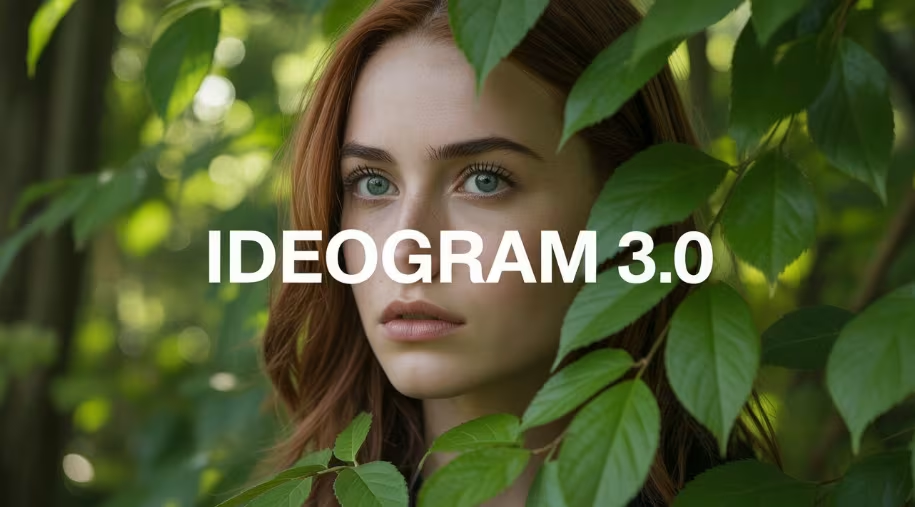
4. Ideogram for POD designs that include text
If you’re doing quote shirts, typographic posters, or designs where the text must be correct, you need a generator that handles lettering well. Many creators use text-capable generators specifically for this.
What it’s best for
- Quote tees
- Slogan merch
- Posters where text accuracy matters
How to use it smartly
- Keep text short and punchy.
- Use clean font-style prompts (bold sans, serif vintage, condensed, etc.).
- Still proofread carefully before publishing.
5. Canva for packaging, editing, and POD-ready exports
Canva isn’t always the best “pure generator,” but it’s one of the best tools for turning AI ideas into POD-ready files. It’s extremely practical for:
- Adding clean typography on top of AI art
- Creating transparent background PNGs
- Building consistent layouts across a collection
- Exporting properly for print
If you’re selling on POD, Canva often becomes your finishing layer—even if you generate the base art elsewhere.
6. Vexels for POD-first design workflows
Some platforms are built specifically for merch creators and focus on POD-friendly assets, templates, and mockups. Vexels is positioned around POD design creation, editable templates, and commercial-friendly merch workflows—useful if you want speed and less “art experimentation.”
What it’s best for
- Merch templates (tees, stickers, mugs)
- Fast niche design production
- Sellers who want less design risk and more plug-and-play
Where it shines: Time-to-listing is fast because the workflow is designed for sellers, not artists.
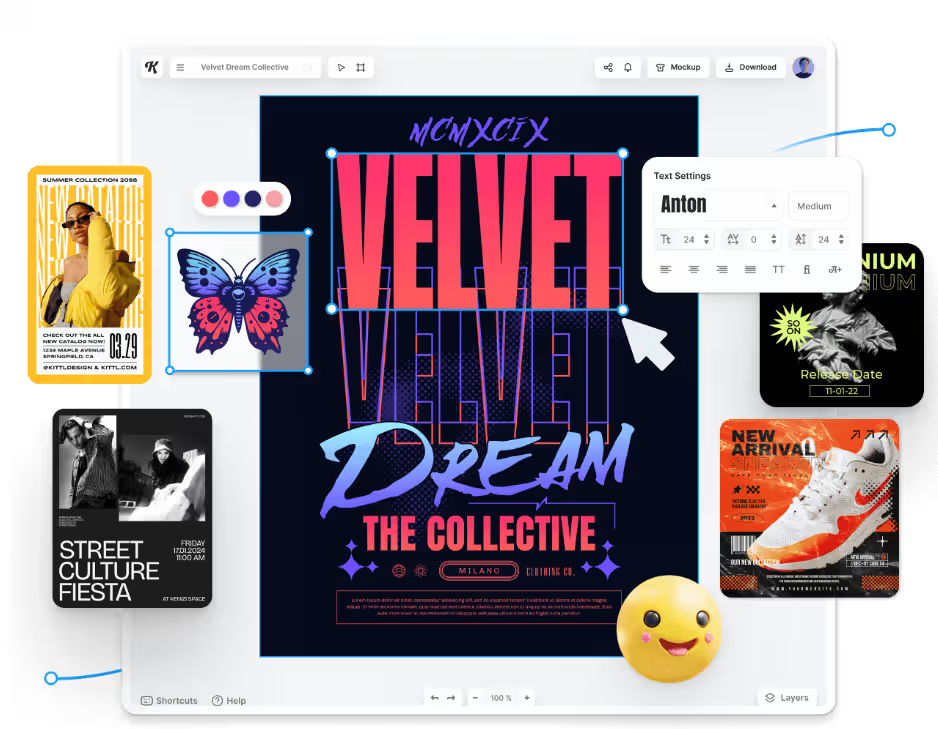
7. Kittl for typography-heavy merch and clean vector-style layouts
Kittl is popular in the POD community because it’s oriented toward merch design, especially when typography and layout matter. If your store is built around retro badges, emblem designs, and text-led apparel, this style of tool is a strong fit.
What it’s best for
- Badge designs
- Vintage typography layouts
- Emblem/crest merch
- Sticker sheets with clean shapes
8. Printify’s built-in AI Image Generator for quick design-to-product flow
If you want the shortest path from “idea” to “product listing,” built-in generators inside POD platforms can be useful. Printify publicly describes its AI Image Generator as powered by OpenAI.
What it’s best for
- Beginners who want a fast workflow
- Quick mockup + product publishing
- Testing niches without extra software
Important note: Even with built-in generation, you still need to check print size, edge clarity, and commercial safety.
Using AI beyond art: the full AI print on demand workflow
AI shouldn’t stop at the design. The highest-earning POD sellers use AI to speed up the entire process: niche research, listing copy, tags, mockups, and marketing. A recent POD-focused AI guide describes using AI to automate repetitive POD tasks like designs, mockups, listings, and support workflows.
Here’s a practical workflow that keeps quality high:
Step 1: Pick a niche that sells (and stays safe)
Don’t start with “cool designs.” Start with customers and intent. Better niches usually have:
- Identity and community (hobbies, professions, lifestyles)
- Gift intent (birthdays, couples, family roles)
- Repeated seasonal buying (holidays, events)
Avoid
- copyrighted characters and brand logos
- celebrity likeness designs
- trademark-heavy phrases
Step 2: Generate 10–20 concepts quickly
Use AI to create variations, not one perfect design. A good prompt structure for apparel:
- Subject + style + composition + color limits + background instruction
Example: “Bold vintage mascot illustration of a happy corgi wearing sunglasses, thick outlines, limited color palette, centered chest graphic, minimal background, screen-print friendly.”
Step 3: Make it print-ready
This is where most POD stores lose quality. Your checklist:
- Upscale the image (don’t rely on small source files)
- Remove background cleanly (transparent PNG for apparel/stickers)
- Sharpen edges and simplify noisy details
- If text is needed, add it in Canva/Kittl rather than inside the generator
Step 4: Create mockups that look real
Mockups sell the product. Use clean lifestyle mockups that match your niche and brand style.
Step 5: Write listings that convert
AI can help here too:
- product title formulas
- benefit-led descriptions
- FAQs and care instructions
- shipping expectation messaging (reduces refunds)
Step 6: Launch 10 designs, then iterate
POD is a volume-and-iteration game:
- launch small collections
- measure clicks, conversion, favorites/saves
- double down on what works
How to use AI designs with Spocket for print on demand
If you want your AI designs to become real products quickly, you need a POD workflow that’s simple and scalable. Spocket offers print-on-demand products that let you upload your designs and sell custom items without holding inventory.
A practical way to use Spocket for AI print on demand is:
- Generate artwork with your chosen AI tool
- Clean it up for print (transparent background + high resolution)
- Apply it to POD items (apparel, stickers, accessories, home products) available through Spocket’s catalog.
- Build collections that match a niche (not random uploads)
- Add complementary dropshipping items to increase AOV (average order value)
That last step is underrated: blending POD hero products with complementary non-POD items can make your store feel bigger and improve bundle purchases.
Common AI print on demand mistakes (and how to avoid them)
Even with powerful AI tools, many sellers lose money not because their designs are bad—but because their workflow is flawed.
Small technical oversights, poor prompt strategy, or weak quality control can lead to blurry prints, refunds, copyright issues, and low conversion rates. Before scaling your AI print on demand store, it’s important to understand the most common mistakes creators make—and how to avoid them so your designs are not just attractive, but truly sellable and production-ready.
- Low-resolution uploads: If your art looks soft on the product mockup, it’ll look worse in real print. Always upscale and preview.
- Too much detail: Ultra-detailed images can look muddy on fabric. For apparel, bold shapes usually sell better.
- Bad backgrounds: If your background removal is rough, prints look unprofessional. Clean edges matter.
- Relying on AI for text: Even “text-friendly” tools can slip. Keep text short, proofread, and consider adding final typography in a design tool.
- Risky content: Anything that resembles popular characters, logos, or trademark-heavy phrases increases takedown risk. Build original concepts.
Picking the best tool based on what you sell
If you want a simple way to choose:
- Selling posters/wall art → prioritize Midjourney / Stable Diffusion for aesthetics
- Selling quote tees → prioritize text-accurate generators + Canva/Kittl finishing
- Selling sticker packs → prioritize clean outlines, flat color styles, easy background removal
- Selling fast trend tests → prioritize ChatGPT-based generation for speed and iteration
- Selling brand collections → prioritize consistency tools (Stable Diffusion workflows)
Conclusion
The best AI art generator for print on demand isn’t the one that makes the prettiest image on screen—it’s the one that helps you produce print-ready, sellable designs consistently. For AI print on demand, prioritize resolution, background control, style consistency, and safe originality.
Once your design workflow is solid, you can move faster and launch smarter. And when you pair AI design output with Spocket’s print-on-demand catalog, you reduce the friction between “idea” and “product,” making it easier to test niches, build collections, and grow a brand that actually lasts.
Start your dropshipping business today
FAQs About AI Print on Demand
What is the best AI art generator for print on demand?
The best choice depends on what you sell. For premium artistic visuals, tools like Midjourney tend to shine, while text-focused merch often needs a generator that handles typography well plus a finishing tool like Canva. The “best” tool is the one that consistently gives you print-ready quality and repeatable style.
Is AI art allowed for print on demand?
In many cases, yes—but you need to ensure your designs are original and don’t include copyrighted characters, logos, or trademark-heavy phrases. Always review commercial terms for the tool you’re using and avoid prompts that produce recognizable IP.
How do I make AI art print-ready?
Upscale your image, clean the edges, remove the background (transparent PNG when needed), and keep designs bold enough to print clearly. If you’re adding text, do it in a design tool to control spelling and layout.
Can I sell AI-generated designs with Spocket print on demand?
Yes. Spocket offers POD products where you can apply your designs and sell without holding inventory, while suppliers handle production and shipping.
What’s the fastest way to start AI print on demand?
Pick one niche, generate 10–20 designs in a consistent style, polish them for print, and launch as a small collection. Then use performance data to decide what to scale, instead of guessing.


Launch your dropshipping business now!
Start free trial


Related blogs

Minea Review: Is It Worth It for Dropshipping Product Research?
Read this Minea review to explore its features, pros, cons, pricing value, and whether it is the right product research tool for dropshipping sellers.


Top AI Tools for Small Businesses in 2026
Learn about the top AI tools for small businesses in 2026 for content, finance, agents, and automation. Pick the best AI tools for small businesses that match your workflows and budget, from free and paid.

Which are the Best Print on Demand AI Tools in 2026?
Find out which are the Print on demand AI tools in 2026. Save time, boost ROI, and improve product quality. Compare features, pricing, and real workflows for POD stores.
