


The Best Time to Post on LinkedIn: Maximize Your Engagement
Don’t know when is the best time to post on LinkedIn? We’ll reveal to you the best time slots for maximizing engagement and increasing reach. Try them out now!


You spend hours writing a post, fixing the hook, and checking the spelling. You hit “Post,” and then… silence. The problem might not be your writing. It might be your timing. If you share content when your network is asleep or deep in meetings, they won't see it.
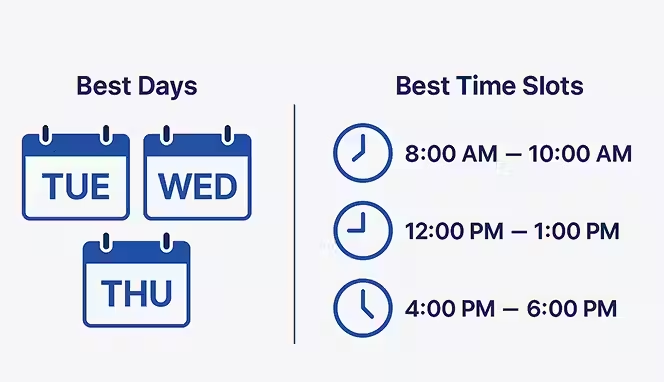
Finding the best time to post on LinkedIn is the first step to fixing this. When you align your schedule with your audience’s routine, you give your content a fighting chance. This guide breaks down the exact windows, days, and habits that help you reach more people in 2026.
Why Does Timing Matter on LinkedIn?
LinkedIn is not like Instagram or TikTok. People use it for work, hiring, and industry news. This means their activity follows a professional rhythm. Most users check the app during specific "micro-moments" in their day: the morning commute, the coffee break, lunch, and the end of the workday.
The LinkedIn algorithm also cares about speed. It measures early engagement to decide if your post is worth showing to more people. This is often called the "Golden Hour." If you get likes and comments in the first 60 minutes, the system signals that your post is high-quality. If you post at 2 AM, no one comments. Your post dies before the sun comes up.
Timing is not a magic fix, but it is a multiplier. Good timing helps good content go further.
The Best Time to Post on LinkedIn
If you want a quick answer, the data points to the middle of the work week. Tuesday, Wednesday, and Thursday are the strongest days. The single best slot is often Tuesday and Wednesday between 10 AM and 12 PM.
Why? By 10 AM, most professionals have cleared their urgent emails. They have settled into their desk and are ready to take a quick break. This is when they scroll.
General Best Times (Global Average):
- Mondays: 11 AM – 1 PM
- Tuesdays: 8 AM – 10 AM (Early risers) and 10 AM – 12 PM
- Wednesdays: 8 AM – 10 AM and 12 PM – 2 PM
- Thursdays: 9 AM – 11 AM and 1 PM – 2 PM
- Fridays: 9 AM – 11 AM
- Weekends: Saturday at 10 AM (Specific niches only)
Monday: The Slow Start
Monday is tricky. People are often in "catch-up" mode. They are deleting emails from the weekend and planning their week. They don't have much mental bandwidth for long articles or complex posts.
Best Time to Post on LinkedIn on Monday: 11 AM to 1 PM.
What to post: Keep it light. Motivational posts, short tips, or "week ahead" questions work well here. If you notice engagement is low, it’s because your audience is busy working. Avoid posting before 10 AM on Mondays. Most people are too focused on their to-do lists to care about your content.
Tuesday: The Power Day
Tuesday is arguably the strongest day for engagement. The "Monday blues" are gone, and people are working at full speed. They are checking LinkedIn for news and updates.
Best Time to Post on LinkedIn on Tuesday: 8 AM to 10 AM.
What to post: This is the day for your heavy hitters. Share your case studies, detailed how-to guides, or major company announcements. The morning slot (8 AM) catches people on their commute or with their first coffee. The late morning slot (10 AM - 11 AM) catches them on their first break.
Wednesday: The Midweek Peak
Wednesday is consistent. It rivals Tuesday for the top spot. We see high engagement throughout the workday, specifically around lunch.
Best Time to Post on LinkedIn on Wednesday: 12 PM to 2 PM.
What to post: Wednesday is great for discussions. Polls, controversial industry takes, and questions perform well. People are willing to stop and comment during their lunch break. If you have a newsletter, Wednesday morning is a solid time to drop it.
Thursday: The Decision Day
Thursday is often when B2B decisions happen. Executives are looking to wrap up projects before the weekend.
Best Time to Post on LinkedIn on Thursday: 9 AM and 1 PM to 2 PM.
What to post: Share social proof. Client testimonials, results, and "before and after" stories work well here. You want to influence the people who are in a "get things done" mindset. Late afternoon (4 PM) can also work for lighter content as people start to wind down.
Friday: The Wind Down
Friday engagement drops off sharply after lunch. People are mentally checking out. They are thinking about their weekend plans, not your B2B software solution.
Best Time to Post on LinkedIn on Friday: 7 AM to 9 AM.
What to post: Get in early or don't bother. If you miss the morning window, save your post for next week. Good Friday content includes weekly recaps, "wins of the week," or personal stories. Human-centric content works better than technical content on Fridays.
Saturday and Sunday: The Weekend Shift
For years, experts said, "Never post on weekends." That is changing. As remote work blurs the lines between home and office, more people check LinkedIn on Saturdays.
Best Time to Post on LinkedIn on Weekends: Saturday 10 AM to 1 PM. Sunday evenings (6 PM - 8 PM).
What to post: This is strictly for personal branding. Career advice, personal stories, and "life lessons" do well. No one wants to read a white paper on a Saturday. Sunday evening is interesting because people are prepping for the week. A "Sunday Scaries" post or a planning tip can hit the right note.
Best Times to Post on LinkedIn for Different Industries
The general rules don't apply to everyone. A nurse works different hours than a software engineer. You will need to adjust your schedule based on who you want to reach.
B2B and Tech
Software engineers and product managers often check LinkedIn later in the day.
- Best times: Tuesday and Thursday, late afternoons (3 PM – 5 PM).
- Why: They start their day with stand-ups and deep work. They check social media when their brain needs a rest in the afternoon.
Healthcare and Education
These professionals are on their feet. They don't sit at a desk all day.
- Best times: Early morning (6 AM – 8 AM) or lunchtime (11 AM – 1 PM).
- Why: They check their phones before their shift starts or during their dedicated break. Evening posts often get missed because they are exhausted.
Finance and Legal
This is a high-pressure crowd. They check LinkedIn for market news early.
- Best times: Before the market opens (6 AM – 8 AM).
- Why: They want to be the smartest person in the room. If you give them news they can use in their morning meeting, you win.
Marketing and Creative Agencies
Marketers live on social media. They are online all day, but they are most active when they are looking for inspiration.
- Best times: Mid-morning (10 AM) and late afternoon (4 PM).
- Why: They use LinkedIn as part of their job. They are likely to engage with content that helps them do their work better or faster.
How to Handle Time Zones
If you are in New York but your clients are in London, when do you post? You have two options:
- Split the difference. Post at 7 AM EST. That is 12 PM in London. You catch the US morning crowd and the UK lunch crowd.
- Rotate your schedule. Post on Tuesday for the US and Thursday for the EU.
- Pick your primary market. If 80% of your revenue comes from California, post on Pacific Time. Do not ruin your main engagement just to catch a few people in a different zone.
The 2026 Linkedin Algorithm: Quality Over Frequency
The LinkedIn algorithm has changed. It used to reward people who posted every day. Now, it prefers quality. It measures "dwell time"—how long someone stops to read your post. This means a long, well-formatted post published at the best time to post on LinkedIn will beat a short, lazy post published every day.
Key factors for 2026:
- Comments matter: Long comments (over 15 words) are worth more than short ones. Ask questions that require a real answer.
- Don't post twice: If you post twice in 24 hours, you hurt your own reach. The second post will "cannibalize" the first one. Wait at least 18 to 24 hours between posts.
- No external links: The algorithm hates when you send people away from LinkedIn. Put your links in the comments or your bio, not the post body.
Tools to Help You Stick to the Schedule
You cannot always be at your computer at 10 AM on a Tuesday. You need tools to do the work for you.
- Buffer: Simple and clean. Good for individuals.
- Taplio: Built specifically for LinkedIn. It helps you find content ideas too.
- AuthoredUp: Great for formatting your posts so they look good on mobile.
- Hootsuite: Better for large teams who manage many accounts.
How to Test Your Own Best Time
Data is helpful, but your audience is unique. You need to run your own tests.
Week 1: Post every day at 8 AM.
Week 2: Post every day at 12 PM.
Week 3: Post every day at 5 PM.
Look at your analytics. Which week got the most comments? Not likes—comments. Likes are vanity. Comments prove people are reading. Once you find your winner, stick to it for a month. Then test again.
Common Mistakes That Kill Engagement
Even if you find the best time to post on LinkedIn, you can fail if you make these mistakes:
- Editing immediately: If you edit your post in the first 10 minutes, it can reset your engagement score. Proofread before you hit publish.
- Posting and ghosting: If you don't reply to comments in the first hour, you waste the Golden Hour. Block out time to reply.
- Tagging too many people: If you tag 20 people and they don't reply, the algorithm thinks you are spamming. Only tag people who will actually answer.
Conclusion
Finding the best time to post on LinkedIn is about respect. It shows you understand when your audience is ready to listen. Start with Tuesday or Wednesday mornings. Test what works for your specific industry. Avoid Mondays and Friday afternoons unless you have a good reason. But remember, the clock won't save bad content. Write something useful, format it well, and then use the clock to give it the push it needs.
Start your dropshipping business today
LinkedIn Posting Strategy FAQs
How many times per week should I post on LinkedIn?
Three to four times a week is the sweet spot. Data shows that posting everyday yields diminishing returns because your posts compete with each other. The algorithm keeps content alive for days. If you post Monday, Wednesday, and Thursday, you stay visible without annoying your network or burning out. Quality always beats volume in the current feed.
Does the type of content change the best posting time?
Yes, it does. Text-only posts and PDFs are easy to consume, so they work well during morning commutes (8 AM). Video requires sound and attention, so it performs better during lunch breaks (12 PM) or after work. If you post a long video at 9 AM on a Monday, people will scroll past it because they are too busy to watch it.
Is it better to post from a personal profile or a company page?
Personal profiles almost always get more reach. People trust people, not logos. The best time to post on LinkedIn for a personal profile is usually mid-morning. Company pages struggle with organic reach. If you must use a company page, aim for Tuesday/Wednesday mid-days and ask employees to engage with the post immediately to help it gain initial traction.
Should I use hashtags in 2026?
Use them, but sparingly. Three to five relevant hashtags are enough. The algorithm now penalizes "keyword stuffing" with 20+ hashtags. Place them at the bottom of your post. Do not hide them in the comments; the algorithm reads the post body to categorize your content. Use broad tags like #Marketing mixed with niche tags like #B2BStrategy.
What is the "Golden Hour" on LinkedIn?
The Golden Hour is the first 60 minutes after you publish. The algorithm watches closely during this time. If your post gets likes, comments, and shares quickly, the system marks it as "high quality" and shows it to people outside your network. If the first hour is silent, the post usually stops spreading. This is why timing your post correctly is vital.
Can I use third-party schedulers, or does LinkedIn punish them?
You can use schedulers. LinkedIn does not penalize you for using tools like Buffer or Taplio, provided the content is good. The myth that "native posting is better" has been debunked by recent data. However, you must be online when the scheduled post goes live to reply to comments. A scheduler posts for you, but it cannot engage you.


Launch your dropshipping business now!
Start free trial.avif)


Related blogs

How to Set Up Automated Order Fulfillment With Spocket and Shopify
Set up a smoother Shopify dropshipping workflow with Spocket by connecting your store, importing products, processing orders, syncing tracking, and reducing manual fulfillment tasks.


How to Open a Business Bank Account for Your Dropshipping Store
Set up your dropshipping finances the right way with a dedicated business bank account built for payouts, supplier payments, taxes, and long-term store growth.

Spocket vs Dropified: Which Tool Is Better for Multi-Store Scaling?
Compare Spocket and Dropified for multi-store dropshipping, supplier quality, automation, fulfillment, product sourcing, and scaling across ecommerce platforms.
