


How to Use Live Chat on Your Dropshipping Store to Increase Conversions
Turn dropshipping visitors into buyers with live chat strategies for product questions, cart support, customer trust, and conversions.
.avif)

Getting visitors to your dropshipping store is only the first step. The real challenge is turning those visitors into paying customers. A shopper may like your product, add it to the cart, and still leave because one question remains unanswered.
Maybe they are unsure about shipping. Maybe they want to know if the product is the right size. Maybe they need help choosing between two options. In a physical store, a sales assistant would answer these questions immediately. Online, live chat can do the same job.
Live chat gives shoppers real-time support while they are still browsing. It helps reduce hesitation, build trust, and guide customers toward checkout. For dropshipping stores, where customers may not already know your brand, this can make a big difference.
When used well, live chat is not just a support tool. It becomes a conversion tool that helps customers feel more confident before they buy.
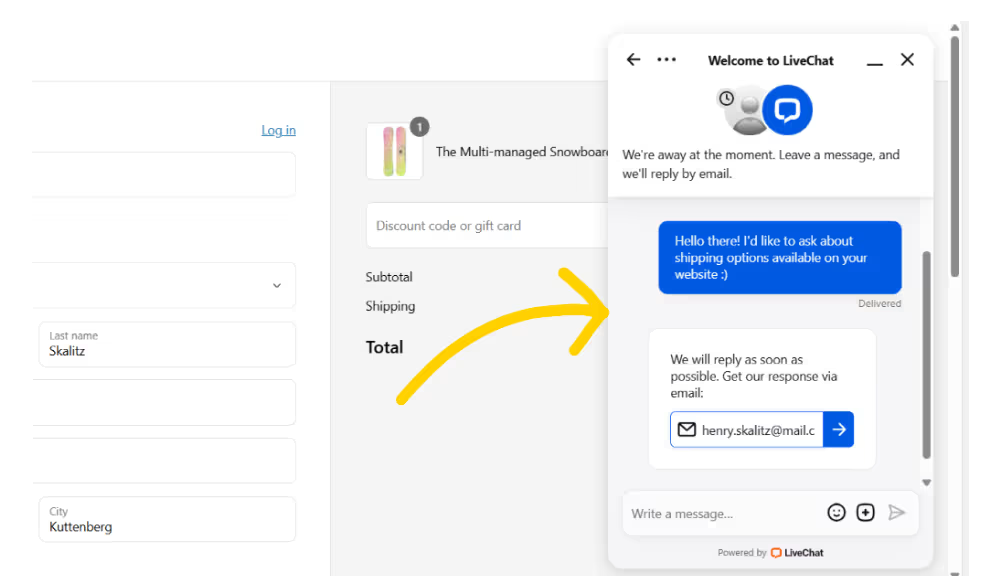
Why Live Chat Matters for Dropshipping Stores
Live chat helps dropshipping stores create a more responsive shopping experience. Instead of forcing customers to search through FAQs or wait for an email reply, it gives them quick answers at the moment they need them.
This matters because dropshipping customers often have more doubts than usual. They may ask where the product ships from, how long delivery will take, whether the product is accurate to the photos, or what happens if they need to return it.
If these questions are not answered quickly, the customer may leave.
Live chat can help you:
- Answer product questions in real time
- Reduce checkout hesitation
- Recover potential abandoned carts
- Recommend relevant products
- Explain shipping and return policies
- Build trust with first-time visitors
- Collect customer objections
- Improve product pages based on repeated questions
A store without live chat can feel silent and distant. A store with helpful live chat feels more active, trustworthy, and easier to buy from.
The goal is not to pressure shoppers into buying. The goal is to make the buying decision easier.
Where to Add Live Chat on Your Store
Live chat should be visible without being annoying. A small chat button in the bottom corner of your store usually works best because it stays accessible while customers browse.
The most important pages for live chat are the pages where customers are likely to have purchase-related questions.
Add live chat to:
- Product pages
- Collection pages
- Cart page
- Shipping policy page
- Return policy page
- FAQ page
- Contact page
- Checkout support pages
Product pages are especially important because customers may want to confirm size, material, use case, compatibility, or shipping details. Cart pages are also valuable because shoppers there have already shown buying intent.
You can also adjust the chat message based on the page. On product pages, the message can offer help choosing the right item. On the cart page, it can ask if the customer needs help before checkout.
For example: “Have a question before ordering? I can help with product details, shipping, or returns.”
This kind of message feels helpful because it matches what the shopper may be thinking.
Ways to Use Live Chat to Increase Dropshipping Conversions
Live chat works best when it is used with a clear strategy, not just added as a small support widget. The tactics below show how to place chat at the right moments, answer buyer doubts faster, recommend products naturally, recover cart hesitation, and use customer conversations to improve your store experience over time.
1. Use Proactive Chat Without Being Pushy
Proactive chat means starting a conversation before the customer asks for help. It can increase engagement, but only when used carefully.
If a chat message appears the second someone lands on your site, it may feel distracting. But if it appears after a shopper spends time on a product page or pauses in the cart, it can feel useful.
Good proactive chat triggers include:
- Visitor spends time on a product page
- Visitor returns to the same product
- Visitor adds an item to cart
- Visitor stays on the cart page without checking out
- Visitor visits the shipping or return policy page
- Visitor browses multiple products in one collection
- Visitor shows exit intent
Helpful proactive messages include:
- “Need help choosing the right option?”
- “Have a question before you order?”
- “I can help with shipping or return questions.”
- “Still deciding? I can help you compare products.”
- “Want help finding the best fit?”
Avoid messages that sound too aggressive. Do not pressure shoppers with fake urgency or exaggerated claims. Live chat should feel like assistance, not interruption.
The best proactive chat works like a friendly store assistant. It appears at the right moment and offers useful help.
2. Answer Questions That Stop Customers From Buying
Most live chat conversations reveal what customers are unsure about. These questions are valuable because they show exactly what may be stopping people from buying.
Common dropshipping live chat questions include:
- How long does shipping take?
- Where does this product ship from?
- Can I track my order?
- What is your return policy?
- Is this product true to size?
- What material is it made from?
- Will this work with my device?
- Is the color accurate?
- What if the item arrives damaged?
- Is this product available now?
Every repeated question is a sign that something in your store may need improvement. If customers keep asking about sizing, add a size guide. If they keep asking about shipping, make delivery information clearer. If they keep asking about product use, improve your product description or images.
Use live chat insights to improve:
- Product descriptions
- FAQs
- Size guides
- Shipping information
- Return policy pages
- Product images
- Collection copy
- Checkout messaging
Live chat should not only solve one customer’s question. It should help you improve the entire shopping experience.
3. Create Live Chat Scripts for Faster Replies
Customers expect quick responses on live chat. If every answer is typed from scratch, your replies may become slow or inconsistent. Scripts help your team respond faster while keeping the tone helpful and professional.
You can create scripts for common topics such as:
- Shipping questions
- Return policy questions
- Product sizing
- Order tracking
- Product recommendations
- Discount questions
- Damaged item support
- Cart assistance
- Product compatibility
Here are a few examples you can adapt.
Shipping Question Script
“Delivery times depend on the product and destination. You can find the estimated shipping details on the product page or at checkout. I’m happy to help check this item for you.”
Product Recommendation Script
“Sure, I can help. Are you looking for something based on size, budget, style, or use case? Once I know that, I can suggest the best option.”
Return Policy Script
“We want you to feel confident before ordering. You can review our return policy here, and I can also help clarify anything about this specific product.”
Cart Support Script
“Need help before checking out? I can answer questions about shipping, sizing, product details, or returns.”
Scripts should not sound robotic. Use them as a base, then personalize the response based on the customer’s question.
4. Use Live Chat to Recommend Products
Live chat can do more than answer support questions. It can also help shoppers choose the right product.
This is useful when your store has multiple similar items. A customer may not know which pet carrier, beauty tool, storage product, or gadget fits their needs. A short chat can guide them toward the best option.
Ask simple questions like:
- “Who are you buying this for?”
- “What size are you looking for?”
- “Is this for daily use or occasional use?”
- “Do you prefer something compact or spacious?”
- “Are you shopping for comfort, style, storage, or durability?”
- “What problem are you trying to solve?”
Then recommend products based on their answer.
For example: “Based on what you shared, this option may be better because it has more storage space and works well for travel. If you want something smaller, this second option may be easier to carry.”
This feels more personal than a generic product page. It also helps reduce returns because the customer is more likely to choose the right product.
Product recommendations should always be honest. If a product is not right for the customer, suggest a better option instead of forcing the sale.
5. Use Chat on Product Pages to Reduce Doubt
Product pages are where most purchase decisions happen. A shopper may like the product but still needs one final answer before clicking “Add to Cart.”
Live chat can reduce that hesitation by answering questions product copy may not fully cover. Customers may ask:
- “Is this good for beginners?”
- “Does this come in a larger size?”
- “Can this be cleaned easily?”
- “Is this good for travel?”
- “What is included in the package?”
- “Will this fit my device?”
- “Is the color exactly like the image?”
Your live chat team should know the product details well enough to answer clearly. They should understand size, material, use case, compatibility, shipping expectations, and common objections.
If you use Spocket, this becomes easier because reliable product sourcing and supplier-backed details can help you create clearer product pages. Better product information also helps your support team answer customer questions more confidently.
Live chat should support your product page, not replace it. If customers ask the same question often, add the answer directly to the page.
6. Use Chat on Cart Pages to Recover Sales
The cart page is one of the most valuable places for live chat. A customer who reaches the cart has already shown interest. If they leave now, it is usually because something is making them hesitate. Common cart-stage concerns include:
- Shipping cost
- Delivery time
- Discount codes
- Payment security
- Product quantity
- Return policy
- Product suitability
A helpful cart page message can stop the customer from leaving. Try prompts like:
- “Need help before checking out?”
- “Have a question about your order?”
- “I can help with shipping, returns, or product details.”
- “Need help choosing between items in your cart?”
Cart chat should be quick and practical. This is not the time for long explanations. The customer is already close to buying, so focus on removing the obstacle.
For example:
Customer: “How long will this take to arrive?”
Response: “Delivery depends on your location and the specific product. The estimated timeline will appear at checkout, and I can help check this item’s details before you order.”
The goal is to keep the buying momentum alive.
7. Combine Live Chat With Chatbots
You do not have to be online all day to make live chat useful. Chatbots can answer common questions, collect customer details, and guide shoppers when your team is unavailable.
For dropshipping stores, chatbots can help with:
- Shipping timelines
- Order tracking
- Return policy
- Product availability
- Size guides
- Discount information
- Store hours
- FAQs
- Contact details
A chatbot can also collect the customer’s email, order number, or question so your team can follow up later. However, automation should not replace human support completely. Some questions need a real person, especially when the customer is close to buying or has a specific concern.
A good setup could work like this:
- Chatbot answers basic FAQs.
- Customers can request a human agent.
- Offline messages are saved for follow-up.
- Cart visitors are prioritized.
- Common questions are used to improve product pages.
Automation should make support faster, not colder. Keep the tone friendly and simple.
8. Train Your Team to Sell Without Pressure
Live chat agents should not act like aggressive salespeople. Their job is to help customers make confident decisions.
A good chat conversation feels calm, useful, and personal. If the product is not the right fit, it is better to say so than to push the customer into a poor purchase.
Train your team to:
- Reply quickly
- Use a friendly tone
- Ask clarifying questions
- Avoid vague answers
- Personalize responses
- Explain policies clearly
- Recommend based on customer needs
- Avoid unrealistic promises
- Know when to escalate an issue
- End with a helpful next step
A strong response should do three things:
- Understand the customer’s concern
- Give a clear answer
- Suggest the next step
For example: “Based on what you’re looking for, I’d recommend the larger size because it gives more room and works better for travel. You can also check the size details on the product page before ordering.”
This response is useful because it gives guidance without pressure.
9. Track Live Chat Performance
Live chat should be measured like any other sales tool. If you do not track it, you will not know whether it is improving conversions or only adding support work.
Track metrics such as:
- Number of chats started
- Average response time
- Resolution time
- Missed chats
- Customer satisfaction
- Conversion rate after chat
- Cart recovery rate
- Most common questions
- Product pages with the most chats
- Revenue influenced by chat
Repeated questions are especially important. They show where your store may be unclear. For example:
- If customers ask about shipping, improve shipping details.
- If they ask about sizing, add a size guide.
- If they ask how to use a product, add better images or FAQs.
- If they ask about returns, make the policy easier to find.
Live chat gives you direct insight into buyer objections. Use that information to improve your store continuously.
Best Practices for Dropshipping Live Chat
Live chat works best when it is simple, fast, and aligned with the rest of your store experience. It should help customers feel supported without interrupting their shopping journey. Follow these best practices:
- Keep the chat widget visible but subtle.
- Use proactive chat on high-intent pages only.
- Reply as quickly as possible.
- Use scripts, but personalize the message.
- Be honest about shipping timelines.
- Do not overpromise product quality or delivery.
- Add FAQs based on repeated chat questions.
- Use chatbots for basic questions.
- Escalate complex issues to a human.
- Track chat-influenced sales.
- Keep the tone friendly and clear.
- Use chat insights to improve product pages.
Most importantly, treat live chat as part of your conversion strategy, not just customer support. Every conversation can teach you what customers need before they buy.
Conclusion
Live chat can help dropshipping stores increase conversions by answering customer questions at the exact moment they are deciding whether to buy. It reduces hesitation, builds trust, supports product discovery, and helps recover shoppers who may otherwise leave.
The key is to use it strategically. Add live chat to high-intent pages, use proactive messages carefully, prepare helpful scripts, combine chatbots with human support, and track the conversations that lead to sales.
With reliable sourcing through Spocket and a clear live chat process, your dropshipping store can feel more responsive, helpful, and trustworthy. That can make the difference between a visitor leaving with doubts and a customer completing their order.
Start your dropshipping business today
FAQs about Live Chat on Your Dropshipping Store
Does live chat increase dropshipping conversions?
Yes, live chat can increase conversions by giving shoppers quick answers about products, shipping, sizing, returns, and checkout concerns. It works best when replies are fast and helpful.
Where should I add live chat in my store?
Add live chat to product pages, cart pages, FAQ pages, shipping pages, return policy pages, and contact pages. These are the places where customers often have questions before buying.
Should I use a chatbot or human live chat?
Use both if possible. Chatbots are useful for common questions and after-hours support, while human agents are better for product recommendations, complaints, and complex concerns.
What questions should live chat answer?
Live chat should answer questions about shipping, returns, sizing, materials, compatibility, tracking, availability, discounts, and product recommendations.
How can live chat recover abandoned carts?
Use chat prompts on the cart page to ask if the shopper needs help before checkout. Quick answers about shipping, payment, returns, or product details can reduce hesitation.


Launch your dropshipping business now!
Start free trial


Related blogs
Dropshipping Supplier Directory: Where to Find Vetted Suppliers
Browse our directory of vetted dropshipping suppliers across the US and EU, complete with niches, shipping speed, and pricing. Start your free trial today.

How to Negotiate With Dropshipping Suppliers: 9 Tactics That Actually Work
Learn how to negotiate with dropshipping suppliers on price, MOQs, and payment terms. Proven tactics and email scripts to boost your margins. Try Spocket free.

Best Clothing Dropshipping Suppliers: The 2026 Guide
Compare the best clothing dropshipping suppliers for 2026 — US/EU shipping speeds, pricing, and product quality — and find the right fit to launch your store.
