


How to Dropship Using Squarespace
Learn how to start Squarespace dropshipping step-by-step — from setting up your store, choosing suppliers, integrating with dropshipping apps, managing orders, and marketing for sales.

.avif)

Squarespace is best known for clean design and simple site building, but it can also power a full ecommerce store that sells products you never physically touch. That’s the appeal of Squarespace dropshipping: you focus on branding, product selection, and marketing, while a supplier handles inventory and shipping.
Done right, Squarespace dropshipping can become a real side hustle that supports passive income goals over time, and it’s one of the more approachable ways to make money online without needing a warehouse. The key is setting it up like a real store, not a quick experiment. That means choosing the right Squarespace plan, connecting the right fulfillment workflow, building product pages that convert, and creating a shipping and support system that customers trust.
This guide walks you through the complete process, step by step, with practical decisions, common pitfalls, and optimization tips so you can launch confidently and scale.
What Squarespace dropshipping means

Squarespace doesn’t “do dropshipping” by itself. Squarespace provides the storefront: your website, product pages, cart, checkout, and order dashboard. Dropshipping happens when you connect Squarespace to a supplier system that can:
- Provide a product catalog you can list in your store
- Sync inventory so you don’t oversell
- Route orders to suppliers automatically (or semi-automatically)
- Send tracking details back to you (and ideally to customers)
You typically set this up through an integration, usually via the official extensions ecosystem or through a supplier workflow that supports ecommerce stores. Squarespace has documentation on how extensions work and how to connect them to your site, which is useful before you choose any tool.
Is Squarespace good for dropshipping
Squarespace can be a strong choice if you care about brand presentation and want a smooth, minimal setup. It’s especially good for:
- Creators and small brands who want a high-end look
- Stores with a curated catalog (not tens of thousands of items)
- Sellers who prioritize content, storytelling, and design-led ecommerce
- Beginners who want a simpler backend than “plugin-heavy” platforms
Where it can feel limiting is in very advanced logistics, complex product customization, or deep automation across many suppliers. You can still build those systems, but the “sweet spot” is a well-branded store with a focused niche and a clean customer experience.
What you need before you start
Before you touch templates and products, set these basics. It saves hours later.
Pick a niche with clear buyer intent
A niche is more than a category. “Fitness” is broad. “Compact home gym accessories for apartment workouts” is specific. The more specific you are, the easier it is to:
- Choose products that match a real problem
- Write product descriptions that don’t sound generic
- Build trust with a consistent brand voice
- Run ads and SEO with cleaner targeting
Decide your fulfillment approach
Most Squarespace dropshippers choose one of these models:
- Catalog integration: you import products from a supplier system and fulfill orders through it
- Agent/supplier relationship: you list products manually and send orders to a supplier yourself
- Hybrid: top products are integrated; special items are fulfilled manually
If you want less admin work, aim for a catalog integration that supports product sync and order automation.
Prepare your brand assets
Minimum assets to launch cleanly:
- Logo (even a simple wordmark)
- 2–3 brand colors and fonts
- A short brand story and positioning statement
- Basic policy pages (shipping, returns, privacy, terms)
Step-by-Step Setup for Squarespace Dropshipping Success
Before you start importing products or running ads, you need a solid operational foundation. These next steps walk you through setting up your Squarespace store correctly — from choosing the right plan to connecting suppliers — so your dropshipping business is structured for smooth fulfillment, clean checkout, and long-term scalability.
Step 1 - Choose the right Squarespace plan for ecommerce
To dropship, you need Squarespace ecommerce features enabled. Squarespace explains which plans support commerce functionality and physical products.
When selecting a plan, consider:
- Whether you need advanced shipping features
- Whether you need discounting and promo tools
- Whether you plan to sell subscriptions or bundles later
- How many staff need access to order management
If you’re starting lean, choose a plan that supports physical products and a full checkout experience, then upgrade only when your workflow demands it.
Step 2 - Build your store foundation the pages that drive trust
A dropshipping store wins when it feels like a real brand. Before adding products, create the pages that answer buyer anxiety.
Essential store pages
- Homepage: clear value proposition, best sellers, social proof, FAQs snippet
- Shop / Collections: organized browsing with categories and filters where possible
- Product pages: strong visuals, clear shipping expectations, returns promise
- About: your brand story and why you curate these products
- Contact: email form + response-time expectation
- Policies: shipping, returns, privacy, terms
A simple trust framework for dropshipping
On your homepage and product pages, include:
- A delivery estimate range (not a vague “ships soon”)
- A return window and what’s excluded
- Support hours and typical reply time
- Order tracking promise
This reduces disputes and improves conversion rates.
Step 3 - Set up your ecommerce settings payments taxes and checkout
This step makes your site “sell-ready.” Configure it before importing products.
Payments
Enable the payment methods you want to accept and make sure your business name appears correctly. A mismatch between brand name and payment descriptor can increase chargebacks.
Taxes
Sales tax setup depends on where you operate and where you sell. At a minimum, configure your home-state rules correctly and document when you’ll register in additional states if you scale.
Checkout experience
Go through checkout like a customer:
- Is shipping shown clearly
- Are taxes surprising at the final step
- Does the confirmation email look branded
- Are policy links visible
A clean checkout is one of the biggest “silent” conversion boosters.
Step 4 - Connect a dropshipping integration the cleanest way to start
Squarespace dropshipping becomes practical when you can import products and automate fulfillment. Squarespace provides an extensions ecosystem to connect third-party services.
What to look for in a dropshipping integration
Prioritize:
- Fast shipping options for your target market
- Reliable stock syncing
- Simple product import with variants
- Automated order routing
- Tracking sync back to Squarespace
- Clear pricing and support
A popular path for US and EU supplier access
If your strategy is faster delivery and higher perceived quality, many sellers use a supplier marketplace extension focused on US/EU fulfillment. If you want to explore that route, you can review Spocket’s Squarespace extension listing .
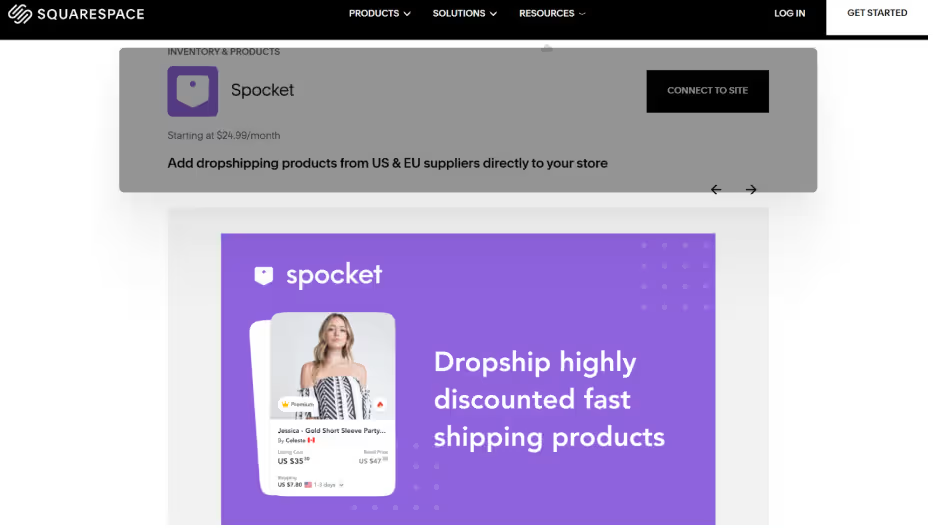
Note: You don’t have to use any single provider. Choose based on your niche, shipping needs, and automation preference.
Step 5- Import products the right way so they convert
Importing is easy. Importing and converting is the real work.
Even when a tool pulls product titles and descriptions automatically, rewrite them. Generic descriptions are one reason dropshipping stores struggle to stand out.
Product selection rules that reduce refunds
Pick items with:
- Clear use case (customers instantly “get it”)
- Low chance of sizing issues (or strong sizing charts if apparel)
- Strong photo quality and consistent variants
- Reasonable shipping times and stable stock
Avoid items that:
- Depend on “miracle results” claims
- Have confusing options or complex compatibility needs
- Are fragile without proven packaging
Product page structure that sells
For each product page, aim for:
1) Above the fold
- Clear title
- 1-sentence benefit statement
- Price and variant selection
- Shipping estimate snippet
- 3 trust bullets (returns, tracking, support)
2) Description (scannable)
- Who it’s for
- What problem it solves
- Key features (bullets)
- What’s included
- Care instructions (if relevant)
3) Shipping and returns
- Delivery time range
- Tracking availability
- Return window and conditions
Step 6 - Set shipping rules that match your supplier reality
Shipping is where dropshipping either feels professional or falls apart. If your supplier ships in 7–12 business days, don’t promise 2–3 days.
Build shipping rules that:
- Match supplier timelines
- Keep your margins safe
- Reduce cart abandonment
Recommended shipping setup for dropshipping
- Offer one simple default option first (Standard Shipping)
- Add an express option only if your supplier can truly support it
- Consider free shipping thresholds once you have stable margins
If you need help navigating shipping settings and the general structure, start with Squarespace’s commerce documentation and shipping guidance within their support ecosystem.
Step 7 - Test your order workflow before you launch
This is non-negotiable. Run at least one test order end to end.
Test checklist
- Place an order using your own payment method
- Confirm the order appears in Squarespace
- Confirm the order routes to your supplier workflow
- Confirm tracking is generated and sent back properly
- Confirm customer emails look correct
- Confirm your support inbox receives replies and contact form works
Also test:
- A refund scenario
- A return request workflow
- A “where is my order” support flow
When issues happen later, you’ll already have a process.
Step 8 - Launch your Squarespace dropshipping store the smart way
A smart launch is controlled, not chaotic.
Soft launch first
Before ads, do a soft launch:
- Share with friends or a small email list
- Run low-budget traffic to a single product
- Validate checkout, shipping, and support timing
Then scale what works
Use early data to refine:
- Product pages with low conversion
- Shipping price points
- Variant naming and sizing charts
- Support templates
Managing orders customer service and returns in dropshipping
Dropshipping success is mostly operations and customer experience.
Order management basics
Daily routine:
- Check new orders
- Confirm supplier processing status
- Watch for out-of-stock alerts
- Monitor tracking delays
Weekly routine:
- Audit refunds and reasons
- Identify product quality problems
- Improve descriptions where expectations are unclear
Customer service templates that save time
Prepare short templates for:
- Order confirmation reassurance
- Shipping delay update
- Address change request
- Return request instructions
- Refund confirmation
Most dropshipping support is repetitive. Templates turn chaos into a system.
Returns policy that protects you and feels fair
A strong policy does two things:
- Sets expectations clearly
- Prevents abuse
Include:
- Return window (example 14–30 days)
- Item condition requirements
- Which items are final sale
- Who pays return shipping
- Refund timeline after receiving item
SEO for Squarespace dropshipping
SEO is where Squarespace dropshipping becomes sustainable. It’s also the difference between a store that depends on ads and one that grows with compounding traffic.
Use them where they make sense:
- H1 and first paragraph (primary)
- 1–2 H2s
- Collection page descriptions
- FAQ section
- Image alt text (when relevant)
Product page SEO checklist
- Unique product title (not copied)
- 150–200 word unique description minimum
- Feature bullets with real detail
- Image filenames and alt text
- Internal links to related products and collections
- FAQ snippet addressing shipping and returns
Content marketing that works for dropshipping
Create articles like:
- “Best [niche] gifts” lists
- “How to choose [product type]” guides
- “Before you buy” checklists
- Comparison content (without making unsupported claims)
Each piece should link to relevant collections and best sellers.
Marketing your Squarespace dropshipping store without burning cash
A dropshipping store can become one of the more realistic “apps to make money” style businesses, but only if you control acquisition costs. Start simple.
Channel 1 - Short-form video with UGC style
Record:
- Unboxings (sample products when possible)
- “3 reasons this solves X” demos
- Before/after usage (only if honest and supportable)
- “What I ordered vs what I got” transparency clips
Channel 2 - Search-driven content
Target keywords with buyer intent:
- “best [product] for [use case]”
- “[product] vs [product]”
- “how to use [product]”
Channel 3 - Email flows that print revenue
Set up:
- Welcome flow (3 emails)
- Abandoned cart (2–3 emails)
- Post-purchase (care tips + cross-sell)
- Win-back (30–45 days)
Email turns first-time buyers into repeat customers, which is how dropshipping becomes profitable long term.
Common Squarespace dropshipping problems and how to fix them
Even though Squarespace dropshipping is relatively simple to set up, it comes with its own operational and conversion challenges. From slow shipping complaints to low product page conversions and stock sync issues, small gaps in setup can quickly impact customer trust and profitability. The good news is that most of these problems are predictable — and fixable — once you understand where friction typically occurs.
Problem 1 Products look generic and don’t convert
Fix:
- Rewrite titles for clarity
- Add lifestyle images and use-case benefits
- Add FAQs, shipping estimates, and “what’s included”
- Tighten your niche and remove irrelevant products
Problem 2 Shipping complaints
Fix:
- Be transparent on every product page
- Add tracking expectations
- Use a supplier workflow with faster fulfillment when possible
- Create proactive “shipping update” emails
Problem 3 Out-of-stock cancellations
Fix:
- Use inventory sync where possible
- Reduce catalog size and focus on stable products
- Add “notify me” alternatives or recommend substitutes
Problem 4 Refunds due to expectations mismatch
Fix:
- Add dimension charts and sizing guidance
- Use real product photos where possible
- Clarify materials and what the product is not
Scaling Squarespace dropshipping without losing control
Scaling isn’t just adding products. It’s strengthening systems.
Scale lever 1 - Increase average order value
- Bundles and “frequently bought together” suggestions
- Free shipping thresholds
- Quantity discounts (if margin allows)
Scale lever 2 - Improve conversion rate
- Better product pages
- Stronger trust signals
- More reviews (real, verified)
- Faster page load and simpler navigation
Scale lever 3 - Add one new channel at a time
Don’t add TikTok, Pinterest, Google, email, and influencers all at once. Pick one, stabilize it, then expand.
A realistic timeline to launch a Squarespace dropshipping store
Here’s a simple pace that avoids overwhelm:
Day 1–2
- Niche selection and product shortlist
- Brand basics and store structure
Day 3–4
- Build site pages and policies
- Configure payments and checkout
Day 5
- Connect dropshipping integration
- Import products and rewrite descriptions
Day 6
- Configure shipping rules
- Test order workflow end to end
Day 7
- Soft launch + collect feedback
- Fix friction points before ads
This keeps the build focused and avoids the “unfinished store” trap.
Conclusion
Squarespace dropshipping works best when you treat it like a brand, not a shortcut. Build a store that looks trustworthy, choose a supplier workflow you can rely on (check Spocket), set shipping expectations clearly, and rewrite every product page to sound like you—not a copied catalog.
If you want this to become a long-term side hustle that supports passive income goals, focus on two things from day one: customer experience and traffic you can own through SEO and email. With consistent execution, Squarespace dropshipping can grow from a small experiment into a real store that helps you make money online—without the headache of managing inventory.
Start your dropshipping business today
FAQ about Squarespace Dropshipping
Can you dropship on Squarespace?
Yes, by building an ecommerce store and connecting it to a supplier workflow using extensions or an integration.
Do you need a lot of products to start?
No. Start with a curated set of 10–30 strong products, then expand based on what sells.
Can Squarespace handle a real ecommerce business?
Yes, especially for curated catalogs and brand-led stores. The biggest factor is your fulfillment system, not just the website.
Is it possible to start with almost no budget?
You can start lean, but expect some costs for the platform and tools. Still, it’s one of the more accessible ways to make money without investment in inventory, since you’re not buying stock upfront.


Launch your dropshipping business now!
Start free trial


Related blogs
Dropshipping Supplier Directory: Where to Find Vetted Suppliers
Browse our directory of vetted dropshipping suppliers across the US and EU, complete with niches, shipping speed, and pricing. Start your free trial today.


How to Negotiate With Dropshipping Suppliers: 9 Tactics That Actually Work
Learn how to negotiate with dropshipping suppliers on price, MOQs, and payment terms. Proven tactics and email scripts to boost your margins. Try Spocket free.

Best Clothing Dropshipping Suppliers: The 2026 Guide
Compare the best clothing dropshipping suppliers for 2026 — US/EU shipping speeds, pricing, and product quality — and find the right fit to launch your store.
