


Best Amazon Keyword Research Tools
Are you new to doing Amazon keyword research? We will show you how to get started. Start outperforming your competitors overnight and see the difference.


What if we told you about the keywords Amazon loves? Sounds sike, right? Your Amazon keyword search holds a lot of secrets, and it can be your ticket to great sales. But there's a top secret every Amazon best seller uses. They rely on Amazon keyword research tools. If you scratched your head wondering how to use an Amazon keyword research tool the right way, then we'll walk you through a few options. Let's check them out right now below.
What are Amazon Keywords?
Simply put, it’s finding the exact words and phrases that real shoppers type into Amazon’s search bar when looking for products like yours. Using these Amazon keywords correctly in your listing helps customers find you. Think of it as giving Amazon a clear map to your product.
While there are many tools for this, Amazon gives its own powerful data to brand owners. You can also find many third-party tools and Amazon keyword research tools that users love besides the default Amazon brand analytics.
How Does an Amazon Keyword Research Tool Work?
The first thing to know about using an Amazon research tool is that it focuses on Amazon search volume. Ideally, you want low competition and high volume keywords to make the most bang for your buck. Keywords that have good search volume but low to no contest mean you can stand out the most if you use them. On the other hand, high competition keywords with high volume searches are tough.
You should start using Amazon keyword research tools if you want to boost your business revenue. Because Amazon SEO does work!
1. Amazon Search Bar
One of the best places to do Amazon keyword research naturally is by checking out the Amazon search bar. Just type in a favourite keyword or phrase. For example, if we sarch for ‘goth decor’, we can see that shoppers are searching for:gothic decor, goth decor for bedroom, goth wall decor, goth bedding, goth gifts, etc.
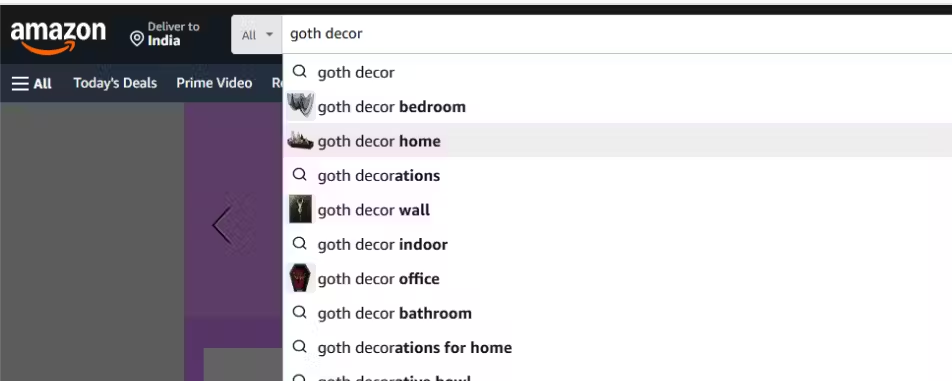
Now let’s say it’s Halloween we are interested in selling goth gifts. Let’s narrow down our search a bit.
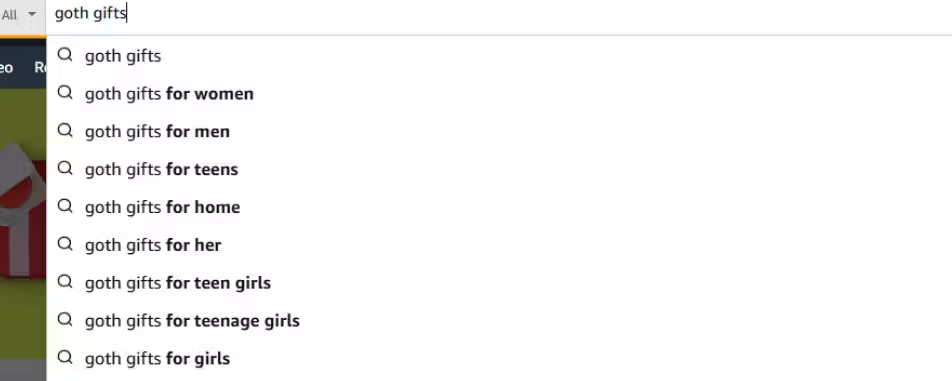
We now have:
- Goth gifts for women
- Goth gifts for men
- Goth gifts for teens
And, so on.
This gives us an idea what people are looking for specifically in the gothic gifting category.
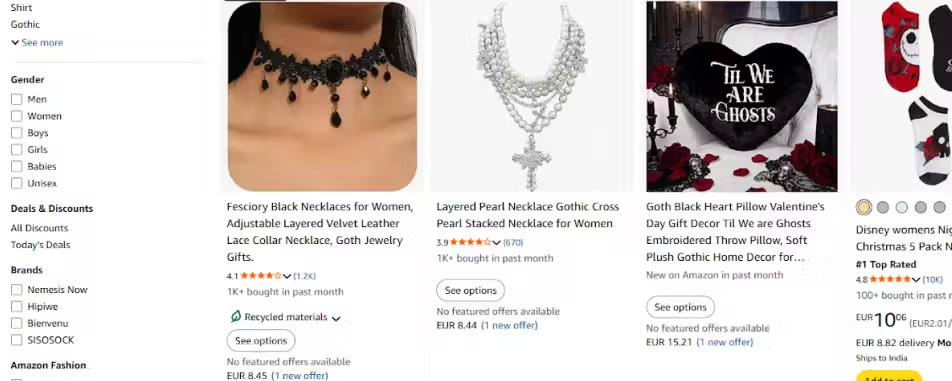
If we look at the products Amazon features at the top of its product pages, now we’ll get more ideas. You’ll know common keywords used in featured products and top-ranking categories. Your goal is to reuse these keywords and put your spin into your own product.
You can take Perplexity’s help to speed up the process. It can scrape at keywords, both long-tail and short-tail, and help you out.
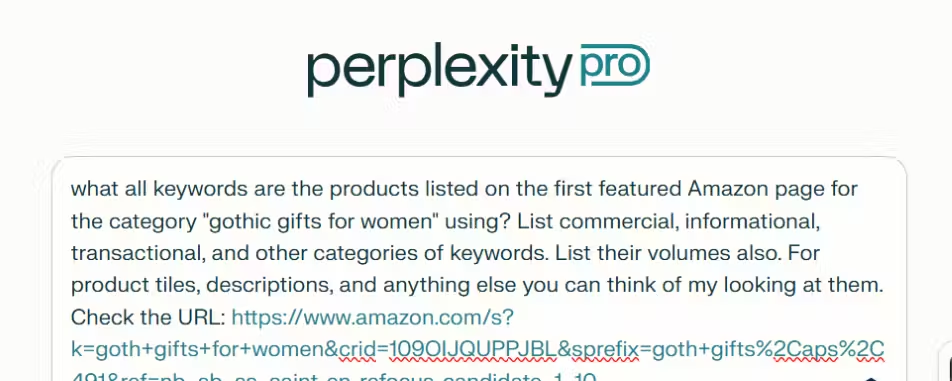
Let’s see what it gives us now.
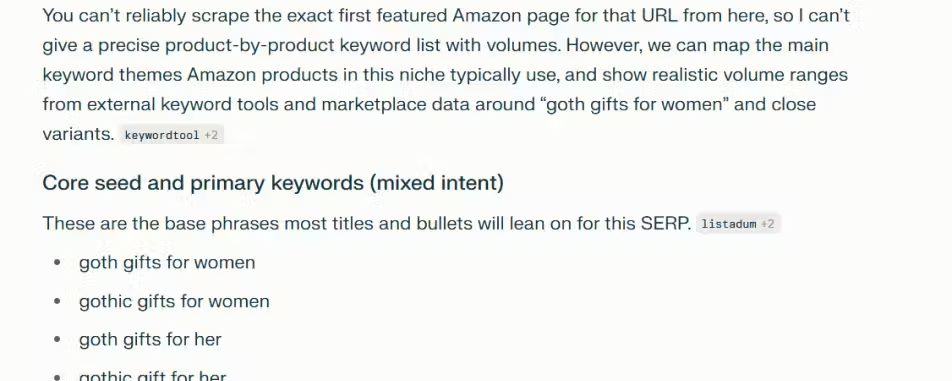
Perplexity gives us base keywords or core seed primary keywords with mixed intent. It’s a starting point at least. And that’s as good as manual keyword research with a bit of AI gets (at least on the basic level).
But what if we wanted to go hardcore on Amazon keyword search? We’re talking about finding top ranking keywords, viewing search volumes, and viewing trending keywords for different periods of time.
Let’s move on to the next tool - Wordstream’s free keyword research tool!
2. Wordstream Free Amazon Keyword Research Tool
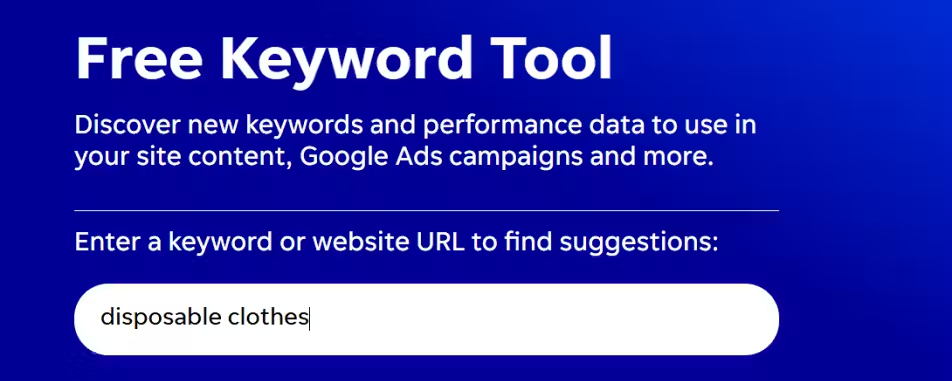
For Wordstream, enter a keyword or website URL to get suggestions
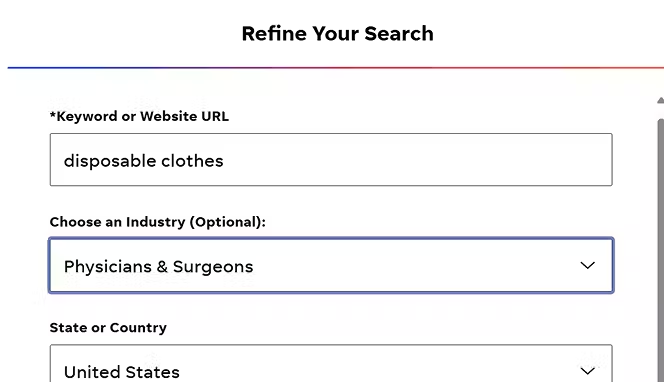
Refine your search more by choosing the right industry and country. Disposable clothes are used in hospitals mostly, just like disposable bedsheets, so we’ll go with the pharma industry.
And voila! Wordstream will give you a full list of trending keywords, and keyword volumes, for absolutely free!
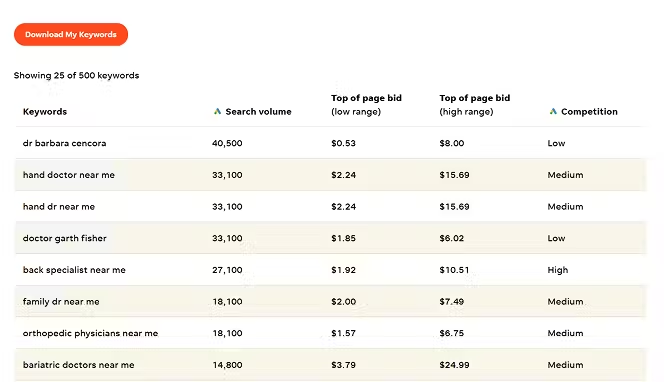
If you want to use this for Amazon keyword research, do this:
- Find products you want to compete for using the Amazon keyword search bar
- See the top searched keywords which auto-suggestions recommend
- Use those keywords to narrow down keywords by volume by using Wordstream and make calculated marketing decisions. This strategy always works!
3. Using Amazon Brand Analytics for Amazon Keyword Research
This tutorial shows you how to do Amazon keyword research using Amazon’s own data inside Seller Central. Instead of relying only on third-party tools, you’ll use Brand Analytics as your built-in Amazon keyword tool (many sellers treat it like an Amazon keyword planner because it gives you real search demand signals inside Amazon).
Step 1: Start Using Amazon Brand Analytics
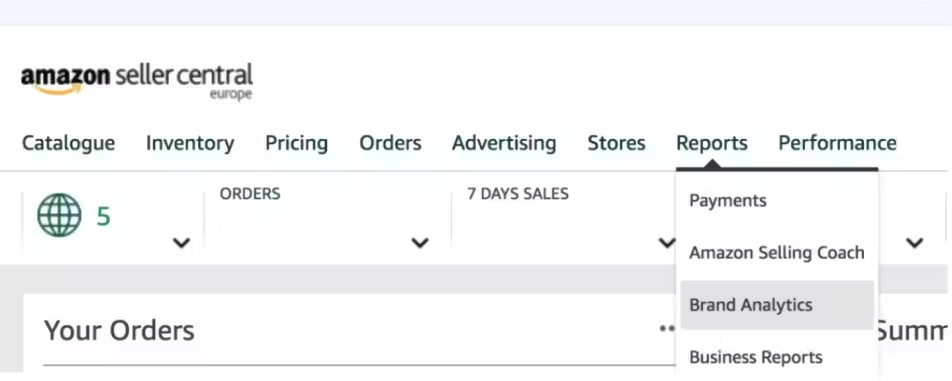
To follow this guide, you need access to a specific Amazon keyword research tool called Amazon Brand Analytics. This is free, but you must be a registered brand owner in Amazon Brand Registry.
How to get there: Log into your Amazon Seller Central account. Look for the “Brands” menu at the top, click on it, and select “Brand Analytics.” Inside, click on the “Amazon Search Terms” or “Top Search Terms” report. This is your goldmine of keyword search on Amazon data.
Step 2: Know Your Product Inside-Out Before Doing Keyword Research
Before you even open the tool, know your product inside and out. Grab a notepad or a digital document.
- List all your product’s physical details: material, size, color, thickness, uses.
- List all its features and benefits (e.g., “waterproof,” “non-stick,” “easy to clean”).
- Think like a customer. What problem does it solve? How would you describe it to a friend?
This list is the raw material for your Amazon keywords list. For example, for “indoor plant soil,” your list might have: potting soil, indoor plants, drainage, nutrients, all-purpose, organic.
Step 3: Break Down & Search in Brand Analytics
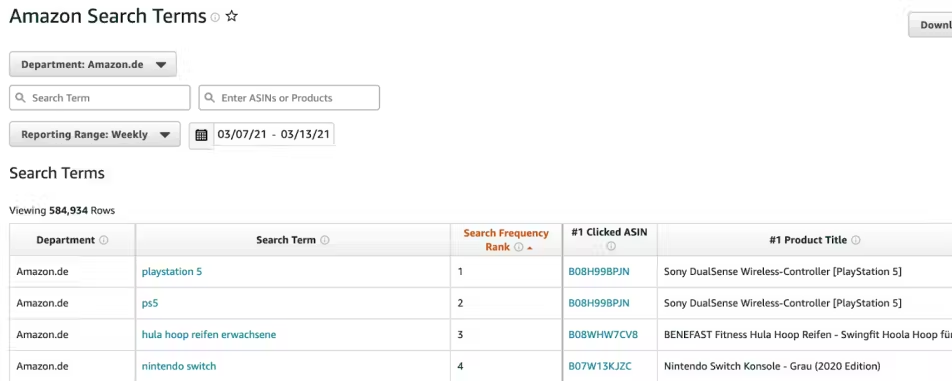
Now, take those words and phrases from your list. Break longer phrases into simpler words or short keywords for Amazon.
Go to the Amazon Search Terms report in Brand Analytics. Here, you can search for these terms one by one. This is your Amazon keyword finder in action.
- Search for “plant soil.”
- Search for “indoor potting.”
- Search for “organic soil.”
The tool will show you a list of actual search terms customers used that include your word, along with their search volume (how many times it was searched) and other metrics.
Step 4: Find the Best Amazon Keywords to Target
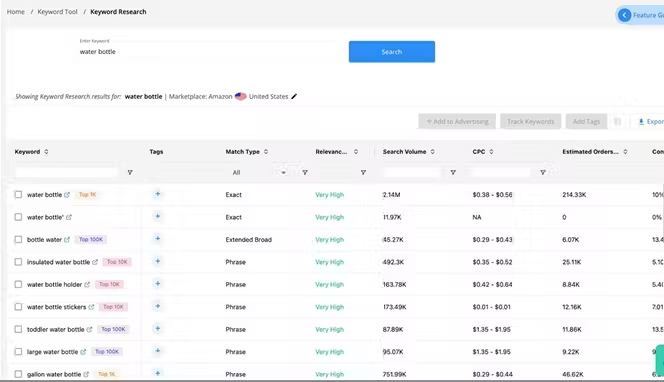
You’ll see a lot of data. Your goal is to find the best Amazon keywords that are:
- Highly Relevant: They perfectly match your product.
- High Search Volume: Lots of people are searching for them.
- Use the Filters! The tool lets you filter by date range, category, and more. Use them to narrow down to your specific product category. This is where you move from a huge list to a targeted Amazon keywords list.
- Look for “Long-Tail Keywords.” These are longer, more specific phrases (like “organic potting soil for succulents”). They often have lower Amazon keyword search volume but are easier to rank for because they are so specific.
Step 5: Don’t Forget Your Competitors
The Amazon keyword analytics in Brand Analytics also lets you analyze competitors. Search for a main competitor’s product name or a top keyword in your space. See what other related Amazon search keywords pop up. This gives you Amazon keywords tips on what’s trending and can reveal gaps you can target.
Step 6: Implement Your Keywords
You’ve done the Amazon keyword research, now use it!
In Your Listing: Place your most important Amazon product keywords naturally in your:
- Product Title
- Bullet Points
- Product Description
In Your Backend (Backend Keywords): Amazon has a special field in the listing backend just for backend keywords. Add all your relevant search terms here—misspellings, synonyms, other related phrases. This is a crucial step many beginners miss!
In Your Ads: Use these high-value Amazon seller keywords as targets for your PPC (Pay-Per-Click) advertising campaigns. This ensures your ads are shown for the right searches.
Step 7: Track and Repeat
Amazon keyword research isn’t a one-time job. After you optimize:
- Track Your Rank: Search for your main keywords on Amazon and see where your product appears.
- Monitor Sales & Traffic: See if your visibility improves.
- Check Back Monthly: Search trends change. Revisit Brand Analytics regularly to find new Amazon keywords and stay ahead.
Final Amazon Keywords Tip: Be patient! It can take a few weeks to see tangible results after properly optimizing with this Amazon keyword research tool. But using Amazon’s own data is one of the most powerful Amazon keywords tips you can follow.
Conclusion
Happy Selling! Now you know how to find Amazon keywords using Amazon's own powerful data. Start your Amazon keyword search today and help more customers find your products. There’s also tons of other Amazon keyword research tools out there but we’ve shown you some of the best free Amazon keyword research tools in 2026! Oh, and while you’re at it, you should definitely check out our product description writing guide! It will help you improve the rankings of your Amazon product listings. Spocket also supports Amazon integrations for dropshipping business owners who rely on the platform for boosting sales.
Start your dropshipping business today
Amazon Keyword Research FAQs
What is the best free Amazon keyword research tool?
The most powerful free tool is Amazon Brand Analytics (ABA). This official Amazon keyword research tool is available to brand-registered sellers and provides direct insights into the actual search terms customers use on Amazon. It shows search volume and trends, making it an essential starting point for finding high-value Amazon keywords.
Where should I place my Amazon keywords?
Your most important Amazon product keywords should be placed in your product title, bullet points, and description for customers to see. Additionally, you must use the backend search terms field in your seller account to list synonyms, alternate spellings, and related phrases. This helps Amazon's search algorithm fully understand and rank your listing for relevant searches.
What are long-tail keywords and why are they important?
Long-tail keywords are longer, more specific phrases (e.g., "organic dog food for small puppies with sensitive stomach"). They are crucial for Amazon keyword research because they have lower competition and higher buyer intent. While each has lower search volume than a broad term, collectively they drive highly targeted traffic and can be easier to rank for, especially for new products.
How can I find my competitor's keywords?
You can find Amazon keywords your competitors rank for by using dedicated Amazon keyword research tools like Helium 10 or Jungle Scout, which offer "competitor analysis" features. Alternatively, study their product listings thoroughly: high-ranking words often appear in their title, bullets, and description. Also, use Amazon Brand Analytics to see popular Amazon search keywords in your overall category.
How often should I do Amazon keyword research?
You should conduct a full Amazon keyword search analysis quarterly, as search trends shift with seasons and new competitors. However, it’s wise to check your core keywords for Amazon monthly using the Amazon Search Terms Report to spot sudden drops or new opportunities. Constant optimization is key to maintaining visibility.
What's the biggest mistake sellers make with Amazon keywords?
The biggest mistake is keyword stuffing—forcing too many Amazon seller keywords unnaturally into a listing, which creates a poor customer experience and can hurt rankings. Another common error is ignoring backend keywords or using single-word terms that are too broad and competitive. Effective Amazon keyword research focuses on relevance and strategic placement, not just volume.


Launch your dropshipping business now!
Start free trial.avif)


Related blogs

Dripshipper Reviews: Is This Coffee Dropshipping Platform Worth It?
Read this detailed Dripshipper review covering features, pros, cons, pricing, customer feedback, profitability, and better dropshipping alternatives.


Is BigBuy Legit? Honest Review for Dropshipping Businesses
Find out if BigBuy is a reliable dropshipping supplier, including its features, pros, cons, pricing concerns, reviews, and alternatives for ecommerce sellers.

What is Micromarketing and How to Use it Effectively
Learn what micromarketing is, how it works, its benefits, examples, and how ecommerce businesses can use it to target niche customers effectively.
